
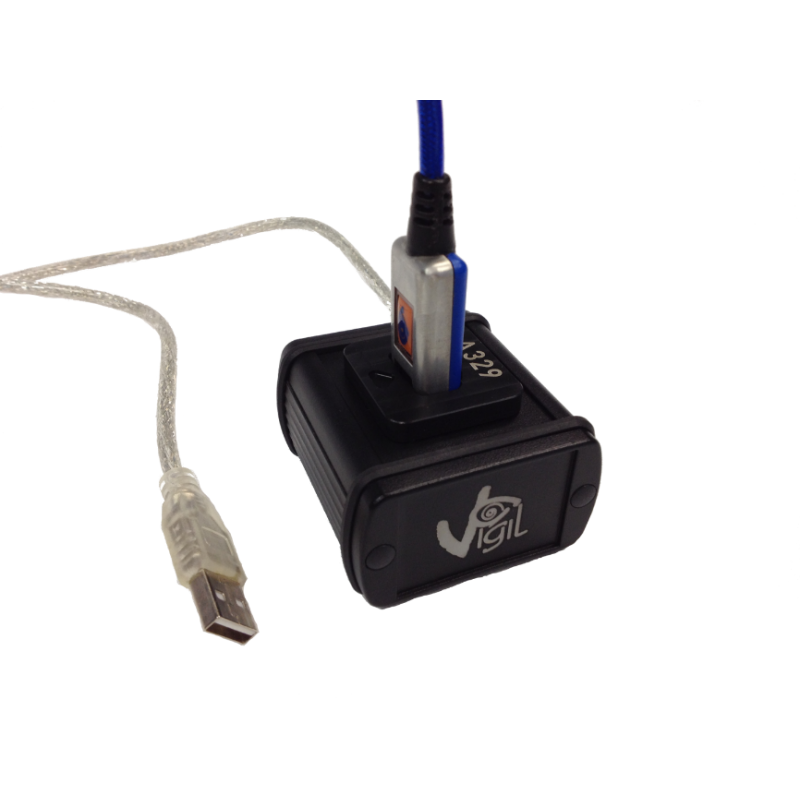

Vigil AAD I.R. Download Box + Software

€249.00
The Vigil AAD I.R. Download Box + Software is a specialized computer-interface accessory developed for compatible Vigil automatic activation devices. Rather than being part of the parachute deployment hardware itself, the system allows information stored by the AAD to be transferred to a computer through the Vigil control unit’s infrared communication interface. Vigil’s documentation states that recorded parameters from the last 16 minutes of freefall, up to a maximum of 16 jumps, can be accessed through the optional infrared download system.
Current Vigil support pages still list a dedicated Vigil Download Box manual, US V2023.03, demonstrating that the manufacturer continues to maintain documentation for the accessory.
Retail documentation describes the interface as connecting to a computer through a standard USB connection and identifies Vigil Download Software 2.34 as one software version supplied for the system. Because computer operating systems and drivers change over time, current compatibility should always be verified against the latest Vigil documentation rather than assuming an older software listing will work unchanged on every modern computer.
Vigil AAD I.R. Download Box + Software – Technical Data Management and Skydiving Equipment Guide
Vigil I.R. Download Engineering, Data Access, Software, and Skydiving Equipment Context
Vigil Infrared Communication and Stored Jump Data
The core purpose of the system is communication between a compatible Vigil unit and a computer.
Vigil manuals describe an infrared communication port built into the control unit. With the optional I.R. Download Box and associated management software, recorded jump information can be transferred for review. The system can access the final 16 minutes of recorded freefall, with a maximum of 16 jumps stored within that period.
Detailed graphical information can then be reviewed for individual recorded jumps. Retail product documentation also notes access to administrative information and compatible unit settings.
Importantly, Vigil documentation warns that the AAD is fundamentally a safety device rather than a dedicated data logger. The download capability should therefore be understood as an additional diagnostic and informational function rather than the primary purpose of the AAD.
USB Connection and Vigil Download Software
The download interface communicates with the computer through USB while using infrared communication at the Vigil unit. Retail documentation for the accessory identifies standard USB 2.0 connectivity and Vigil Download Software 2.34.
That software documentation historically lists compatibility with several Windows generations and Mac operation through virtualization. However, those operating-system references are dated, so contemporary users should consult the latest manufacturer manual and available drivers before purchasing the system specifically for a modern computer. Vigil’s current support page lists the latest Download Box manual as US V2023.03.
Downloaded Graphs and Jump Review
The accessory can provide more than a basic jump count.
Retail documentation describes individual detailed graphs for recorded jumps, while Vigil manuals confirm that stored freefall parameters can be downloaded through the infrared interface.
This can make the system useful for owners, qualified technicians, equipment managers, and riggers who want to review recorded information associated with a particular unit.
Vigil documentation also notes that a rigger can use the system to download test reports generated during decompression-chamber testing.
Changing Compatible Vigil Settings
Retail documentation indicates that certain Vigil settings can be modified through the infrared connection, including mode, altitude correction, and measurement-unit preferences.
Because an AAD is safety-critical equipment, any configuration change should be made according to the current Vigil manual and by a person who understands the implications of that setting.
Software accessibility should never be interpreted as permission to experiment casually with safety-critical configuration.
Vigil Compatibility
A European retailer currently describes the I.R. Download Box as compatible with multiple generations including Vigil, Vigil II, Vigil 2+, Vigil Cuatro, Military II, II+, and II+c units.
However, buyers should still confirm compatibility with the exact serial number and model they own, particularly when dealing with older or specialized units.
Manufacturer documentation should take priority whenever retailer descriptions and equipment history create uncertainty.
Parachute Rig and Skydiving Rigging
The terms parachute rig, skydiving rig, and skydiving rigging describe the broader environment in which a Vigil AAD may be installed.
The download box itself is not part of the main or reserve deployment sequence. Instead, it provides a communication bridge for retrieving data from a compatible AAD.
Installation of the AAD into a rig should follow the harness-container manufacturer’s requirements as well as Vigil’s installation guidance. Vigil’s installation documentation specifically notes that the harness manufacturer normally provides the necessary fitting information.
Parts of a Parachute and Container Skydive Systems
People researching parts of a parachute and container skydive equipment may encounter AADs alongside containers, main canopies, reserves, deployment systems, harnesses, and handles.
The download box should be understood differently: it is a supporting electronic accessory used to communicate with the AAD rather than a textile or deployment component.
This distinction matters because an electronic accessory does not replace inspection, repacking, maintenance, or rigging procedures required elsewhere in the complete parachute system.
Skydiving Equipment List
A broader skydiving equipment list can include the harness-container system, main canopy, reserve canopy, AAD where used, pilot chute, deployment bag, altimeter, helmet, eye protection, jumpsuit, and discipline-specific equipment.
The download system belongs in the maintenance and data-management category.
For an equipment manager, its value lies in accessing recorded information from compatible units rather than becoming another item worn during the jump.
Parachute Jump Australia, Skydive Byron Bay, and Cairns Skydiving
Searches for parachute jump australia, skydive byron bay, and cairns skydiving represent destination and operator interest rather than Vigil Download Box specifications.
Commercial operations may use different AAD brands, container systems, maintenance practices, and equipment configurations.
Consequently, customers should not assume that a specific operator uses Vigil equipment unless that operator confirms its current system.
Weight Limit Skydiving
The search weight limit skydiving concerns jumper, tandem, aircraft, and equipment limitations rather than the infrared accessory.
A download box does not determine the allowable passenger or jumper weight.
Weight restrictions can depend on the approved parachute system, operator procedures, equipment limits, and environmental considerations.
Skydiving Helmet and Skydive Helmets
The terms skydiving helmet, skydive helmets, sky helmet skydiving, sky diving helmet, full face skydiving helmet, skydiving helmet full face, g35 helmet, best skydiving helmet, and cookie g4 helmet all concern head protection.
They are independent of the AAD communication interface.
Likewise, skydiving glasses, skydiver goggles, and can you wear glasses while skydiving concern eye protection rather than AAD data management.
Hook Blade Knife and Skydive Hook Knife
Search terms including hook blade knife, hook knife skydiving, and skydive hook knife concern specialist emergency cutting tools.
They have no technical role in the operation of the Vigil I.R. Download Box.
Emergency tools, AADs, and electronic diagnostic accessories all belong to the wider equipment ecosystem, but each serves a very different purpose.
Tracking Jump and Skydiving Speed
A tracking jump, skydiving speed, and speed sky diving concern freefall disciplines and aerodynamic performance.
Recorded freefall information retrieved from an AAD may be of interest when reviewing a jump, but the Vigil unit should not be treated as a substitute for purpose-built performance instrumentation.
The manufacturer explicitly describes the Vigil primarily as a safety device rather than a data logger.
Wingsuit Sport and Wingsuit Equipment
Terms such as wingsuit sport, wingsuit, vector wingsuit, gliding suit wingsuit, skydiving gliding suit, fly suits, wing suits for sale, price of wingsuit, and tandem wingsuit describe specialized bodyflight equipment or commercial search intent.
The I.R. Download Box does not depend on a particular wingsuit model.
Its concern is communication with the compatible Vigil unit rather than the suit or freefall discipline.
Indoor Wingsuit and iFLY Colorado Springs
The terms indoor wingsuit and ifly colorado springs refer to indoor bodyflight environments.
An AAD is associated with actual parachute systems rather than normal wind-tunnel bodyflight.
Therefore, indoor training equipment should remain separate from Vigil download-system specifications.
Canopy Flight and Landing Flight Risers
Canopy flight, landing flight risers, skydiving downsizing chart, and smallest canopy relate to canopy selection, flight, or progression.
Likewise, safire 3 and fluid wings concern specific canopy-related products or manufacturers.
These have no direct role in operating the infrared download interface.
A download system does not determine whether a canopy is suitable for a particular jumper.
CRW Skydiving
crw skydiving refers to canopy relative work, a specialized discipline.
The presence of a Vigil unit and associated download capability does not determine whether equipment is appropriate for that discipline.
Complete equipment selection should be guided by experience, training, manufacturer requirements, and qualified professional advice.
BASE Jumping, Baseline Jumping, and Base Canopy
The terms base jumping, baseline jumping, and base canopy concern a separate fixed-object parachuting discipline.
These terms should not be blended automatically with aircraft-skydiving AAD equipment.
AAD requirements and equipment configurations can differ significantly between disciplines.
The I.R. Download Box should therefore be discussed only in relation to compatible Vigil installations and manufacturer-supported applications.
Freefly PUD Handle
A freefly pud handle is a deployment-handle configuration used on certain skydiving systems.
It does not interact directly with the I.R. Download Box.
Both products may exist within the same overall rig environment, but their engineering purposes remain separate.
Linewear
The term linewear refers to wear affecting parachute suspension lines and related components.
The infrared interface cannot determine whether suspension lines remain physically serviceable.
Electronic jump records and physical inspection serve different purposes.
Canopy lines, webbing, stitching, and other structural equipment still require appropriate visual and professional inspection.
Fire Parachute and Cypress Fire Skydiving
Searches such as fire parachute and cypress fire skydiving are ambiguous and should not be presented as features of the Vigil system.
In particular, similarly named AAD products from different manufacturers should not be treated as interchangeable with Vigil hardware or software.
Compatibility must be established through exact manufacturer documentation.
Nude Parachute Jump and Skydiving Nude
The terms nude parachute jump and skydiving nude relate to unusual activity rather than AAD technology.
They have no bearing on the I.R. Download Box, data format, software compatibility, or stored jump information.
Skydive Belize and Skydiving Blue Hole Belize
The searches skydive belize and skydiving blue hole belize represent location-based interest.
Like parachute jump australia, they do not indicate which AAD system a particular operator currently uses.
Equipment practices should be verified directly with the relevant operation.
Jumper Pilot
The term jumper pilot concerns pilots involved in aircraft parachuting operations.
While pilots are an essential part of the broader skydiving environment, the download box itself remains an equipment-management accessory for compatible Vigil units rather than an aircraft operational device.
Gear Bag Skydive
A gear bag skydive setup can help protect skydiving equipment during transportation.
The download box, USB cable, and related computer-interface components should likewise be stored carefully when not in use.
Keeping the electronic accessory dry, organized, and protected from impact can reduce avoidable damage.
Skydiving Website, New Skydive, and #Skydiving Latest
Terms such as skydiving website, new skydive, and #skydiving latest relate to general information discovery.
For Vigil configuration and download procedures, the manufacturer’s current manuals should take priority over generic websites, forums, or social-media posts.
Vigil’s official manuals page currently lists the Download Box manual as US V2023.03.
Skydiving Tube
A skydiving tube is a specialty flying or training accessory and has no role in the operation of the infrared interface.
It should therefore remain separate from AAD software and data-management discussions.
Why the Vigil I.R. Download Box Matters
The principal value of the Vigil AAD I.R. Download Box + Software lies in its ability to communicate with compatible Vigil units, retrieve stored freefall information, display detailed jump data, and assist with supported configuration and technical review.
For riggers and equipment managers, the ability to access decompression-chamber test reports can also provide additional diagnostic value.
Overall Technical Perspective
The Vigil AAD I.R. Download Box + Software should be understood as a specialized electronic communication and diagnostic accessory for compatible Vigil AAD units.
Its major functions include computer connectivity through USB, infrared communication with the Vigil controller, access to the last 16 minutes of recorded freefall data with a maximum of 16 jumps, graphical jump review, and access to supported settings.
However, the accessory does not transform the Vigil into a dedicated flight recorder. Vigil explicitly emphasizes that the underlying AAD remains a safety device, and current manufacturer manuals should control configuration, data interpretation, software use, installation, and servicing.
Data Access, Software Reliability, Compatibility, and Practical Professional Use
The Vigil AAD I.R. Download Box + Software is designed as a supporting interface for reviewing information stored by compatible automatic activation devices. Its practical value depends on reliable communication, correct software installation, compatible hardware, disciplined data handling, and appropriate interpretation of the information retrieved. Because the connected device forms part of a safety-critical parachuting system, the interface should be treated as a diagnostic and administrative tool rather than as an invitation to experiment with operational settings. Professional users should prioritize verified compatibility, current documentation, secure handling, and clear record keeping throughout the ownership process.
Communication Reliability
Reliable communication between the interface and the connected device is fundamental.
The infrared link must establish a stable connection before information can be transferred successfully. Physical alignment, clean communication surfaces, cable condition, computer recognition, and software configuration can all influence connectivity.
If communication becomes intermittent, the cause should be investigated rather than repeatedly forcing the process.
Simple issues such as cable damage, incompatible drivers, computer permissions, or incorrect software versions can prevent proper operation without indicating a fault in the connected safety device itself.
USB Connectivity
The download interface depends on a computer connection for data transfer and software interaction.
A physically secure USB connection reduces the likelihood of interruptions during communication.
Loose connectors, damaged ports, or worn cables may cause the device to disconnect unexpectedly.
For professional environments, dedicating a reliable cable and known computer to the system can simplify troubleshooting.
Repeatedly changing computers, adapters, and operating environments can introduce unnecessary compatibility problems and make it more difficult to identify the source of a communication issue.
Software Installation
The software should be installed according to the most current manufacturer documentation available for the interface.
Operating systems change over time, and older applications may not behave identically on newer computers.
Users should avoid assuming that a program that worked on one previous computer will automatically operate correctly after an operating-system upgrade.
Before relying on the system professionally, the complete setup should be tested in a controlled environment so that driver, permission, or compatibility issues can be identified before important data needs to be accessed.
Operating-System Compatibility
Compatibility is one of the most important considerations for long-term ownership.
A dedicated accessory can remain physically serviceable for many years while the computer software environment changes around it.
New operating systems may alter driver support, security requirements, USB behavior, or application compatibility.
For that reason, maintaining a known working computer environment can sometimes be more practical than constantly updating the interface computer.
Professional users should also retain current installation information and software records where permitted.
Data Retrieval
Downloaded information can provide useful insight into recorded events and system history.
However, the data should be interpreted within its intended technical context.
A recorded graph or numerical value does not replace physical inspection of the parachute system.
Electronic information and mechanical inspection serve different purposes.
Data can support technical review, but it cannot confirm the physical condition of webbing, containers, lines, hardware, reserve components, or other structural equipment.
Reviewing Recorded Information
Graphical information can help users understand recorded altitude and freefall-related events associated with the connected device.
Professional users may find this useful when reviewing equipment history or investigating an unusual recorded event.
Nevertheless, interpretation should remain conservative.
One unusual graph does not automatically prove a hardware fault, and a normal-looking graph does not prove that every part of the parachute system is mechanically serviceable.
Recorded information should therefore complement, not replace, qualified inspection.
Device Identification and Records
Good record keeping becomes especially valuable when several units are managed by one operation.
Each unit should remain clearly identified so that downloaded information is associated with the correct serial number and service history.
Mixing records between units can create confusion and reduce the value of the data.
A simple administrative system should therefore link each download session with the correct equipment record, inspection history, and relevant maintenance information.
Professional Equipment Management
Commercial operators, technicians, and equipment managers can benefit from organized data-management procedures.
A dedicated computer, consistent software version, known cables, and clearly labeled records reduce unnecessary complexity.
This approach also makes troubleshooting easier because fewer variables change between sessions.
If a connection problem develops, the user can determine whether the issue is likely related to the computer, cable, interface box, software, or connected device.
Handling the Interface Box
The interface box itself should be treated as sensitive electronic equipment.
It should remain protected from moisture, strong impacts, dust, excessive heat, and crushing forces.
Although it is not worn during a jump, damage to the interface can prevent reliable communication and complicate future data access.
A dedicated protective case or storage compartment can help preserve the accessory between uses.
Cables should also be stored without excessive bending or tension.
Storage Conditions
Electronic accessories benefit from a clean, dry, temperature-controlled environment.
The device should not be left in direct sunlight, damp gear areas, or vehicles exposed to extreme heat.
Moisture can affect connectors and internal electronics, while severe temperature changes may contribute to condensation.
Long-term storage should therefore prioritize environmental stability.
Keeping the interface together with its cable, documentation, and software information can also prevent missing components later.
Troubleshooting Communication Problems
When the system fails to connect, troubleshooting should proceed methodically.
The user should confirm the physical cable connection, computer recognition, software installation, and device positioning before assuming that the interface has failed.
Changing several variables at the same time can make diagnosis more difficult.
A structured approach is more effective.
If the problem persists, manufacturer support or qualified technical assistance should be consulted rather than attempting unauthorized internal repairs.
Data Security and Backup
Downloaded records may have value for equipment management and technical review.
Where appropriate, important records should be stored securely and backed up.
File names should clearly identify the relevant unit and date.
A consistent naming system reduces confusion later.
Professional operators should also consider who is authorized to access or modify stored information.
Administrative control is particularly useful when multiple staff members use the same computer or interface.
Avoiding Casual Configuration Changes
Access to software functions should not encourage casual adjustment of safety-related parameters.
Any available settings should only be changed when the user understands their purpose and is following current manufacturer instructions.
A computer interface can make configuration appear simple, but the consequences of an inappropriate setting may be serious.
Professional discipline therefore remains essential.
The software should support correct equipment management rather than become a tool for experimentation.
Maintenance and Software Updates
The accessory itself generally requires minimal physical maintenance beyond careful handling and connector protection.
However, the software environment may require occasional attention.
Operating-system changes, driver updates, or new manufacturer releases can affect compatibility.
Users should verify changes before relying on an updated computer setup for operational support.
Keeping a record of the last known working configuration can make future troubleshooting substantially easier.
Used Equipment Considerations
When purchasing a previously owned interface, buyers should consider physical condition, cable integrity, included software, documentation, and compatibility with the intended device generation.
A second-hand unit may appear clean while still lacking the correct cable, driver information, or supported software.
Testing the complete system before depending on it professionally is therefore important.
If compatibility is uncertain, manufacturer confirmation should be obtained.
Long-Term Ownership Value
The main value of the download system comes from organized access to stored information and the ability to support equipment review.
For professional users, this can improve record keeping, technical analysis, and administrative oversight.
However, its usefulness depends on maintaining a stable computer environment, protecting the hardware, using current documentation, and interpreting data responsibly.
The interface should remain a supporting tool within a broader equipment-management system.
Overall Practical Perspective
The Vigil AAD I.R. Download Box + Software is most effective when treated as a professional diagnostic and data-management accessory.
Reliable communication, correct software installation, secure records, stable computer compatibility, careful electronic handling, and disciplined interpretation all contribute to its practical value.
Ultimately, the accessory does not replace inspection, rigging knowledge, or manufacturer procedures. It works best when integrated into an organized maintenance environment where recorded information, equipment condition, service history, and current technical guidance are considered together.
Hardware Durability, Software Maintenance, Data Management, and Long-Term Care
The Vigil AAD I.R. Download Box + Software is a specialized electronic interface, so its long-term reliability depends on careful handling, appropriate storage, computer compatibility, connector condition, software preservation, and disciplined record management. Unlike textile equipment that may show obvious wear through fraying or abrasion, electronic accessories can develop problems that are less visually apparent. A damaged cable, contaminated connector, unsupported driver, operating-system update, or incorrect software configuration can interrupt communication even when the interface box appears physically perfect. Consequently, preventive care should address both the physical hardware and the digital environment used to operate it.
Long-Term Hardware Durability
Electronic equipment generally performs best when protected from unnecessary physical stress.
The interface should not be dropped, crushed beneath heavier equipment, or transported loosely among metal components and tools. Repeated impacts may damage the enclosure, connectors, or internal electronics without producing dramatic external evidence.
Therefore, careful handling should become part of normal ownership.
A small protective case can provide useful protection while also keeping the interface, cable, and supporting documentation organized.
Enclosure Condition
The outer enclosure provides the first layer of protection for the internal electronics.
Routine inspection should look for cracks, separation, deformation, unusual movement, or other signs of physical damage.
Minor cosmetic marks do not necessarily affect operation, but substantial enclosure damage deserves attention.
If internal components become exposed, continued operation should be avoided until the device has been properly assessed.
Opening the enclosure unnecessarily can also create additional risks and should not become part of routine maintenance.
Cable Preservation
The communication cable is easy to overlook, yet it can become one of the most frequently handled components.
Repeated sharp bending, pulling, twisting, or crushing can gradually damage conductors or connectors.
Cables should be disconnected by holding the connector rather than pulling directly on the wire.
During storage, they should be arranged loosely without severe bends.
A damaged cable can create intermittent communication that may initially resemble a software or interface problem.
Connector Condition
Connectors should remain clean, dry, and free from obvious physical damage.
Repeated insertion and removal naturally creates some wear, but excessive looseness, bent components, corrosion, or contamination may affect communication reliability.
Liquids and aggressive cleaning products should be kept away from connection points.
If contamination is discovered, cleaning should follow appropriate electronics-care procedures rather than improvised methods that could push debris deeper into the connector or damage its contacts.
Infrared Communication Area
The communication area should remain clean and unobstructed.
Dust, fingerprints, scratches, or physical obstruction may interfere with reliable communication depending on the design and positioning.
Cleaning should remain gentle.
A soft material suitable for electronic equipment is generally preferable to abrasive products.
The communication window should also be protected during storage so that other equipment cannot repeatedly rub against or scratch the surface.
Protecting Against Moisture
Moisture is a significant concern for electronic accessories.
The interface should not be stored in damp equipment rooms, wet bags, or locations where condensation frequently develops.
If the device has been exposed to moisture, it should not immediately be connected to a computer simply to determine whether it still works.
Instead, appropriate assessment and drying should occur first.
Electrical operation while moisture is present can potentially cause additional damage.
Temperature Management
Extreme temperatures should be avoided during both storage and transportation.
Leaving electronic equipment inside a closed vehicle exposed to strong sunlight can create temperatures substantially higher than the surrounding environment.
Similarly, moving equipment rapidly between very cold and warm environments can contribute to condensation.
A reasonably stable indoor storage environment generally provides better long-term protection for the electronics, cables, and connectors.
Dust and Contamination
Dust can accumulate around connectors and communication surfaces over time.
Storage in a closed protective case can reduce unnecessary contamination.
The interface should also remain separated from oils, fuels, solvents, lubricants, and other workshop substances.
Electronic equipment used around technical maintenance areas can easily become contaminated if storage is poorly organized.
Preventing contamination is considerably easier than determining whether a chemical has entered the enclosure.
Software Preservation
Physical hardware may remain serviceable for many years, while computer software can become outdated much faster.
For this reason, software preservation deserves the same attention as hardware preservation.
Professional users should retain legitimate installation information, current manufacturer documentation, and details of the computer configuration known to operate successfully.
When an operating system changes, compatibility should be verified before the previous working environment is removed.
Operating-System Updates
Automatic computer updates can occasionally change drivers, permissions, security settings, or support for older applications.
Therefore, a computer dedicated to technical equipment should be managed carefully.
This does not mean security updates should automatically be avoided.
Instead, important changes should be approached with awareness that software compatibility may need to be rechecked afterward.
Maintaining records of the working configuration can make troubleshooting easier.
Driver Management
Some computer interfaces depend on drivers that allow the operating system to recognize connected hardware.
If driver support changes, the physical interface may appear to stop functioning even though nothing is mechanically wrong.
Driver files should come from legitimate manufacturer-approved sources whenever available.
Random third-party downloads can introduce compatibility, security, or reliability problems.
Professional users should document which driver version is associated with a known working setup.
Dedicated Computer Environment
A dedicated or carefully managed computer can simplify long-term use.
When numerous unrelated programs, adapters, and system modifications are installed, troubleshooting becomes more complicated.
A stable environment reduces the number of variables involved when communication problems appear.
Where practical, professional operators may benefit from maintaining one tested computer specifically for equipment-management applications rather than depending entirely on frequently changing general-purpose machines.
Data Organization
Downloaded information becomes significantly more useful when it is organized properly.
Records should be associated with the correct equipment identification and relevant date.
Clear file naming can prevent confusion when multiple units are managed.
For example, a standardized administrative structure can separate records by individual device and year.
Consistency is more important than creating an unnecessarily complicated database.
The objective is straightforward traceability.
Backup Strategy
Important records should not exist on only one computer.
Hardware failure, accidental deletion, file corruption, or computer replacement can result in permanent data loss.
Where records need to be retained, an appropriate backup strategy should be used.
Backup copies should also remain organized so that obsolete and current information are not accidentally confused.
Professional organizations should establish clear responsibility for maintaining these records.
Data Integrity
Downloaded information should be preserved in its original form whenever it may be needed for technical review.
Editing, renaming, or reorganizing files should be done carefully so that the relationship between the information and the correct device remains clear.
If additional notes are required, keeping them separately from original data can help preserve traceability.
Accurate documentation becomes particularly valuable when investigating an unusual recorded event.
Troubleshooting Methodically.
When communication fails, troubleshooting should proceed one variable at a time.
Check the physical connection, cable condition, computer recognition, software status, permissions, and communication positioning systematically.
Replacing several components simultaneously may restore operation without revealing what actually caused the problem.
A structured process creates a more reliable diagnosis.
Persistent faults should receive manufacturer or qualified technical support rather than unauthorized internal modification.
Preventing Unauthorized Changes
Professional environments may have several people with access to the same equipment.
Access should therefore be controlled appropriately.
Not every staff member needs permission to modify configuration settings simply because they can open the application.
Separating routine data review from authorized configuration changes reduces the risk of accidental alteration.
Administrative procedures should identify who is permitted to make safety-related changes.
Transportation
The interface should be transported in a protective case whenever practical.
The cable should be stored without sharp bends, while connectors should remain protected from dirt and impact.
Heavy equipment should not be placed directly on top of the device.
If the interface experiences a significant drop or crushing incident, physical inspection and functional verification should occur before it is relied upon professionally.
Used Interface Assessment
Previously owned equipment should be evaluated for enclosure damage, cable wear, connector condition, included documentation, software availability, and compatibility with the intended computer environment.
A low purchase price provides little benefit if essential software or communication components cannot be used.
Testing the complete setup provides much more meaningful information than simply confirming that the enclosure looks clean.
Long-Term Care Perspective
Long-term reliability depends on maintaining both sides of the system: physical hardware and digital compatibility.
Protecting the enclosure, cables, connectors, and communication surfaces preserves the electronic interface, while maintaining appropriate software, drivers, documentation, backups, and a stable computer environment protects continued usability.
Ultimately, careful storage, methodical troubleshooting, organized records, controlled access, and manufacturer-supported maintenance provide the strongest foundation for dependable professional use throughout the accessory’s service life.
Be the first to review “Vigil AAD I.R. Download Box + Software”
Related products
Accessories

Accessories


Accessories

Accessories

Accessories

AAD

Reviews
There are no reviews yet.