


L&B Optima2 Skydiving Audible Altimeter – Advanced Audible Altitude Awareness
L&B Optima2 Skydiving Audible Altimeter Overview
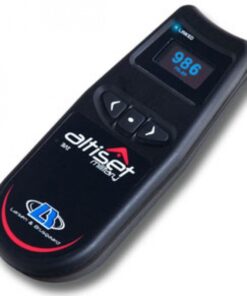
The L&B Optima2 Skydiving Audible Altimeter is a compact digital audible instrument designed to provide experienced users with configurable altitude warnings during high-speed and slower descent. Rather than requiring the wearer to look continuously at a visual display, the unit communicates important selected altitude points through recognizable sound patterns. However, the manufacturer specifically states that the device is a backup instrument and must not be relied upon as the primary method of maintaining altitude awareness.
Why Use the L&B Optima2?
The main reason for choosing the Optima2 is its flexible warning architecture. Four separate warning banks allow different configurations to be retained, while high-speed and low-speed warning functions support different phases of descent. Consequently, an experienced user preparing for a tracking jump, canopy flight, crw skydiving, or wingsuit sport can configure audible references appropriate to the planned activity and training procedures L&B Viso 2+ Digital Skydiving Altimeter.
Furthermore, its compact ergonomic shape is specifically intended for comfortable placement inside soft or hard headgear. External mounting can also be supported using the supplied rigging materials.
How the Optima2 Provides Altitude Awareness
The instrument continually reads ambient atmospheric pressure to determine altitude conditions. It then produces the programmed warning sequence as selected points are reached.
The device can automatically arrange entered warning levels into descending order. Therefore, even if the individual values are entered out of sequence, the unit organizes them so the highest becomes the first warning and the lowest becomes the final warning.
This technology can supplement a broader skydiving equipment list containing a properly maintained parachute rig, skydiving rig, visual instrument, protective headgear, reserve system, and appropriate emergency equipment.
High-Speed Warning Performance
Configurable warning points are particularly useful when altitude changes rapidly.
During skydiving speed or speed sky diving conditions, the available time between two selected altitudes may be short. Audible information can therefore provide another awareness channel without demanding a visual check for every selected reference.
However, the user should already understand each tone before leaving the ground.
Low-Speed Warnings and Guide Tones
The Optima2 also provides slower-descent warning functions. Guide Tones create a sequence of sounds between selected lower-speed warning altitudes, helping the wearer recognize progression through the configured altitude corridor. The manufacturer compares this concept to progressive approach guidance rather than a single isolated alarm.
Such functions can complement established procedures involving landing flight risers, landing flight risers, safire 3, fluid wings, smallest canopy, or research involving a skydiving downsizing chart. However, the instrument does not determine appropriate equipment selection.
Helmet Compatibility and Positioning
Correct positioning is extremely important because an audible warning is useful only when it can actually be heard.
Users comparing a skydiving helmet, skydive helmets, sky helmet skydiving, full face skydiving helmet, sky diving helmet, skydiving helmet full face, g35 helmet, cookie g4 helmet, or the best skydiving helmet should ensure that the chosen setup provides suitable space near the ear.
The manufacturer warns that incorrect mounting may make the alarms difficult to hear during freefall because outside wind noise reduces perceived volume.
Adjustable Sound and Precision Setup
The Optima2 provides adjustable pitch and volume. Manufacturer documentation lists output levels from approximately 112 dB at the lower volume setting to around 117 dB at the upper setting, depending on configuration. Therefore, ground testing should be performed carefully and never with the speaker pressed directly against the ear.
Users wearing skydiving glasses, skydiver goggles, or asking can you wear glasses while skydiving should understand that these concern visual protection, whereas the Optima2 provides audible information.
Wingsuit and Advanced Flight Context
The manufacturer identifies suit flying among the activities for which the device was designed. Therefore, users researching wingsuit, vector wingsuit, gliding suit wingsuit, skydiving gliding suit, fly suits, or indoor wingsuit may encounter this instrument while comparing specialized equipment.
However, wing suits for sale, price of wingsuit, and tandem wingsuit represent separate purchasing or training topics.
Parachute System and Rigging Context
The Optima2 should not be confused with structural parts of a parachute.
Terms such as container skydive, linewear, freefly pud handle, base canopy, and skydiving rigging concern other parts of equipment ownership, inspection, deployment, or maintenance.
Likewise, searches involving a hook blade knife, hook knife skydiving, and skydive hook knife refer to emergency cutting tools rather than altitude instrumentation.
Specialized Jumping and Safety Equipment
Search terms including base jumping and baseline jumping involve highly specialized activities with their own training and equipment considerations.
Similarly, fire parachute and cypress fire skydiving refer to entirely different safety or equipment subjects.
Owning an audible instrument does not substitute for specialized training, current experience, proper equipment inspection, or established operating procedures.
Worldwide Jumping and Destination Searches
People looking for parachute jump australia, skydive byron bay, cairns skydiving, skydiving blue hole belize, skydive belize, or ifly colorado springs are generally researching facilities, destinations, or experiences rather than this specific instrument.
Likewise, new skydive, skydiving website, and #skydiving latest are broader discovery searches.
Other Important Search Considerations
The phrase weight limit skydiving relates to operator rules, equipment ratings, aircraft limitations, and harness fit rather than the Optima2 itself.
A jumper pilot or experienced operator must consider the complete equipment system.
Meanwhile, searches such as gear bag skydive concern transportation, while skydiving tube refers to another equipment or activity category.
Finally, phrases such as nude parachute jump and skydiving nude have no technical relationship to the instrument.
When and Where the Optima2 Is Most Useful
The device is particularly valuable when an experienced user wants multiple recognizable altitude cues while maintaining attention on the surrounding environment. It can be configured before entering the aircraft, and the manufacturer specifically states that the unit must be active before boarding.
Its altitude-offset capability is also useful when the landing location has a different elevation from the departure airfield. The correct difference can be entered beforehand so the configured reference corresponds appropriately to the intended landing location.
Why Its Design Matters
The Optima2 combines compact helmet integration, four warning banks, configurable faster and slower descent warnings, Guide Tones, ascent-warning capability, adjustable pitch and volume, selectable feet or meters, and altitude offset in one specialized electronic instrument.
Therefore, when it is configured correctly and combined with visual altitude monitoring, disciplined preparation, appropriate equipment, and professional training, the L&B Optima2 provides a valuable secondary layer of altitude awareness for experienced users across several advanced disciplines.
Warning Configuration, Sound Recognition, Helmet Placement, Altitude Awareness, and Practical Operation
The L&B Optima2 is most effective when its warning system is configured with a clear purpose and then used consistently. Its sound-based design allows the wearer to receive altitude cues without constantly checking a visual display, which can reduce unnecessary head movement and help preserve attention for the surrounding environment. However, the device works best as a secondary information source. Visual monitoring, established procedures, current training, and sound decision-making should remain central to every operation.
Understanding the Warning Structure
The unit allows the user to create a sequence of audible alerts at selected altitude points.
Each warning should have a specific meaning.
One signal may indicate an early awareness point, another may identify a later transition, and a final one may carry greater urgency.
The most useful setup is one that can be understood instantly.
A complicated sequence can create hesitation, while a simple arrangement is easier to remember.
Setting the First Warning
The first warning should provide an early cue.
Its purpose is usually to bring attention back to the planned sequence before a more critical stage is reached.
The selected value should reflect the user’s established procedures.
It should not be chosen simply because another person uses the same setting.
Personal experience, training requirements, and the activity being performed all matter.
Setting the Second Warning
The second warning can represent a later stage in the descent.
Its purpose should be different from the first.
The user should know exactly what response or awareness is expected when this tone is heard.
This makes the sequence more structured.
Repeatedly changing the meaning of the same tone can make recognition slower.
Setting the Final Warning
The final warning should have a clear and unmistakable meaning.
Because it represents a later point, it should not be used as an excuse to delay normal awareness.
The user should already be monitoring altitude independently.
The sound acts as another reminder rather than as permission to wait.
Configuring Slower-Descent Alerts
The additional slower-speed warnings extend the usefulness of the device beyond the fastest phase of descent.
These can be programmed to create additional awareness points after the descent rate changes.
The values should still be selected carefully.
They should support existing procedures rather than replace them.
Using Progressive Guidance Tones
The repeating guidance function can provide more information than a single isolated alert.
Instead of hearing only one tone at one altitude, the user receives repeated cues across a defined range.
This can help communicate progression.
However, the pattern should be practiced before use.
An unfamiliar repeating tone can become distracting if the user does not immediately understand its meaning.
Managing Multiple Stored Profiles
The device can store different configurations for different situations.
This is useful when the same unit is used across several types of activity.
Each stored profile can contain its own warning values.
However, the user must verify the active profile before every session.
A stored configuration is only useful if the correct one has been selected.
Avoiding Profile Confusion
Different profiles should remain clearly understood.
If several configurations are almost identical, the user may forget which one is active.
This creates unnecessary risk.
Each stored setup should have a clear purpose.
The user should also review the selected values whenever switching between profiles.
Adjusting Volume
Volume should be tested with the complete helmet in place.
A setting that sounds extremely loud outside the helmet may be less noticeable once padding, shell material, and wind noise are involved.
The goal is not simply to use the maximum level.
The goal is to achieve clear recognition without excessive discomfort.
Choosing the Right Pitch
Pitch affects how easily the tones can be distinguished.
Some users hear certain frequencies more clearly than others.
A suitable pitch should remain obvious in the intended environment.
Once a useful setting is found, frequent unnecessary changes should be avoided.
Consistency helps build faster recognition.
Checking Speaker Position
The speaker should sit close enough to the ear for clear sound transmission.
If it sits too far away, the tone may seem weak.
If the device presses too tightly against the head, it may become uncomfortable.
The ideal position provides both audibility and comfort.
Securing the Device
The instrument should remain stable inside the helmet.
A loose device can shift position during movement.
If the speaker moves away from the ear, sound clarity can decrease.
The mounting pocket or retention system should therefore be checked regularly.
Testing With the Complete Helmet
A realistic sound test should be performed while wearing the helmet exactly as it will be used.
The visor, chin strap, padding, and other components can change how the sound is perceived.
Testing in open air alone is not enough.
A complete fit check gives a better indication of real-world performance.
Preparing Before Boarding
Most configuration work should be completed before boarding.
The active profile, warning values, battery status, volume, pitch, and speaker position should all be confirmed.
This reduces the need for rushed changes later.
Preparation is more reliable when completed in a calm environment.
Avoiding Last-Minute Programming
Rushed changes increase the chance of selecting an incorrect value.
If a change must be made shortly before use, the full setup should be reviewed again.
The user should never assume that a newly entered value is correct without checking it.
Understanding Pressure-Based Measurement
The device determines altitude using atmospheric pressure changes.
As altitude changes, pressure changes with it.
The electronics interpret those changes and trigger programmed sounds at the selected points.
Because environmental pressure can vary, the user should understand that correct setup remains important.
Using Altitude Offset Correctly
If the landing reference differs from the departure location, an offset may be appropriate.
The correct value should come from reliable operational information.
It should not be estimated casually.
An incorrect offset can shift the warning sequence relative to the intended ground reference.
Cold-Weather Use
Cold temperatures can reduce battery performance.
Before use in cold conditions, the battery should be checked carefully.
The user should also confirm that the device responds normally.
If the unit has been stored in very cold conditions, allowing it to stabilize before final setup can help reveal any unusual behavior.
Hot-Weather Use
Extreme heat should also be avoided.
The device should not remain inside a closed hot vehicle for long periods.
High temperature can affect batteries and electronic components.
If the instrument becomes unusually hot, it should be allowed to cool gradually before use.
Managing Condensation
Condensation can form when equipment is moved quickly between cold and warm environments.
If moisture appears, the unit should be allowed to dry before use or storage.
The helmet should also be dried fully.
Trapped moisture can create long-term reliability problems.
Managing High Background Noise
Fast airflow produces a noisy environment.
The user should understand that this can affect how warnings are perceived.
Correct speaker placement and suitable volume help, but no sound system should be assumed to remain perfectly audible in every condition.
This is one reason visual monitoring remains essential.
Avoiding Dependence on Sound Alone
An audible device can fail.
A tone can be missed.
A battery can weaken.
A profile can be configured incorrectly.
The user should therefore continue using visual checks and established procedures.
The sound system should add redundancy rather than replace another awareness method.
Recognizing Unexpected Warnings
If a tone occurs at an unexpected moment, the user should not automatically assume the device is correct.
The situation should be evaluated using other available references.
Afterward, the configuration should be reviewed.
Unexpected behavior may result from a wrong profile, incorrect value, environmental condition, or equipment issue.
Reviewing Performance After Use
After each session, the user should consider whether every warning was clear.
The timing should have matched expectations.
The volume should have been adequate.
The device should also have remained comfortably positioned.
Any unusual behavior should be investigated before the next use.
Making Configuration Changes Carefully
When warning values are changed, the reason for the change should be understood.
The new sequence should be tested before operational use.
Frequent changes without a clear reason can reduce familiarity.
A stable and well-understood setup usually provides better practical performance.
Training for Immediate Recognition
The user should become familiar with the sound sequence through repeated controlled testing.
Each tone should have an immediate meaning.
The goal is to avoid conscious interpretation during a demanding phase.
Familiarity makes the system more useful.
Supporting Situational Awareness
One of the strongest advantages of the device is that it can provide information without requiring the user to look directly at it.
This can help preserve attention for other tasks.
However, the device should not dominate awareness.
The user still needs to monitor the environment continuously.
Practical Operational Value
The L&B Optima2 performs best when configuration, sound recognition, helmet placement, battery management, and environmental awareness are treated as one complete system.
Clear warning meanings reduce hesitation.
Stable speaker placement improves audibility.
Suitable volume and pitch improve recognition.
Correct profile selection prevents configuration errors.
Proper altitude reference management supports reliable warning timing.
Regular checks reduce unexpected problems.
When these practices are combined with disciplined visual monitoring, current training, and established procedures, the device becomes an effective secondary altitude-awareness instrument for experienced users.
Maintenance, Battery Care, Speaker Protection, Helmet Fit, Storage, and Long-Term Reliability
The L&B Optima2 is a compact electronic instrument, and its reliability depends heavily on regular inspection, correct battery care, clean storage, and careful handling. Because the unit provides audible information close to the ear, even small problems with the speaker opening, mounting position, battery condition, or controls can reduce its usefulness. A simple maintenance routine can help preserve dependable performance and make potential faults easier to identify before the device is needed.
Building a Routine Inspection Schedule
The device should be inspected before and after regular use.
The housing should be checked for cracks, impact marks, loose components, or unusual wear.
The controls should respond consistently.
The sound opening should remain clear.
Battery condition should also be reviewed.
A short inspection only takes a few moments, yet it can reveal issues before they develop into more serious problems.
Checking the Outer Housing
The housing protects the internal electronics from everyday handling and environmental exposure.
Although the device is designed for active use, unnecessary impact should still be avoided.
The unit should not be stored loosely with heavy metal equipment.
If cracks, deep scratches, or structural damage appear, the device should be examined carefully before it is used again.
Protecting the Sound Opening
The sound outlet must remain clear.
Foam, dirt, fabric, tape, dust, or other material can reduce the clarity of the audible output.
The opening should be checked periodically, especially if the unit remains installed in a helmet for long periods.
Sharp tools should not be inserted into the opening because they could damage the internal component.
Checking Sound Quality
The user should become familiar with the normal sound of the device.
A clear, consistent tone is expected.
If the sound becomes weak, distorted, intermittent, or unusually rough, the cause should be investigated.
Battery condition, speaker obstruction, mounting position, or physical damage may be responsible.
Any noticeable change should be treated as useful diagnostic information.
Battery Management
Battery care is one of the most important parts of ownership.
The user should monitor power condition regularly and replace the batteries before reliability becomes uncertain.
Waiting for complete failure is unnecessary.
Fresh batteries are inexpensive compared with the inconvenience of losing the device during use.
Preventing Unexpected Power Loss
A predictable replacement schedule can help reduce unexpected shutdown.
The user should also avoid ignoring signs of weak power.
If the display or sound behaves unusually, battery condition should be checked first.
Correct replacement cells should always be used.
Substituting unsuitable batteries can reduce reliability and may damage the electronics.
Inspecting the Battery Compartment
The battery area should remain clean and dry.
Contacts should be checked for corrosion, residue, or discoloration.
If contamination appears, the compartment should be handled carefully.
Aggressive scraping or unsuitable chemicals can cause additional damage.
The cover should also close securely and should not show signs of cracking or distortion.
Long-Term Battery Storage
If the device will remain unused for an extended period, long-term storage procedures should be considered.
Battery removal may be appropriate during very long storage intervals.
This can reduce the possibility of leakage.
Before the unit is returned to service, the compartment should be checked thoroughly and fresh batteries fitted if necessary.
Control and Button Care
The controls should operate smoothly and predictably.
A button that becomes sticky, loose, or difficult to operate may indicate contamination or wear.
Repeatedly forcing the control is not recommended.
If normal operation cannot be restored through gentle external cleaning, professional inspection is preferable.
Preventing Accidental Changes
During transport, other objects can press against the controls.
This may result in unintended changes.
The current configuration should therefore be checked after travel or extended storage.
A quick review can prevent a previous accidental adjustment from carrying into the next session.
Helmet Pocket Inspection
The internal mounting area should remain clean.
Foam particles, lint, dust, or fabric fibers can gradually collect around the device.
This can affect sound transmission or reduce mounting security.
The pocket should be checked periodically and cleaned gently.
Maintaining Correct Position
The device should remain close enough to the ear for clear sound.
If it shifts too far away, alerts may become weaker.
If it presses too strongly against the head, comfort can suffer.
The best position combines stability, audibility, and comfort.
Preventing Movement During Use
The unit should not move freely inside the helmet.
A loose fit can change the speaker position during movement.
This may make the sound less noticeable.
The retention pocket or mounting arrangement should therefore be checked regularly.
Padding compression over time can affect how firmly the device is held.
Moisture Protection
Moisture can reduce electronic reliability.
If the device becomes wet, it should be dried before storage.
It should not be sealed immediately inside a damp bag.
The helmet should also be allowed to dry completely.
Trapped moisture can remain close to the electronics for many hours.
Managing Condensation
Condensation can form when equipment is moved rapidly between cold and warm environments.
If moisture appears, the unit should be allowed to stabilize naturally.
The device should not be stored while still damp.
Repeated condensation should also be treated as a sign that storage procedures may need improvement.
Cold-Weather Care
Low temperatures can reduce battery efficiency.
Before use in cold conditions, battery status should be checked carefully.
The device should also be tested for normal sound and control response.
If it has been stored in a very cold environment, it should be allowed to stabilize before final preparation.
Hot-Weather Care
Extreme heat should also be avoided.
The instrument should not be left inside a closed vehicle or directly under strong sunlight for long periods.
Heat can affect batteries and internal electronics.
If the unit becomes unusually hot, it should be allowed to cool before use.
Dust and Sand Exposure
Fine particles can collect around controls and openings.
After dusty use, the exterior should be cleaned gently.
Compressed air should not be forced into the device.
This may push particles deeper inside.
A soft cloth is generally a safer choice for routine care.
Coastal and Salty Environments
Salt residue can encourage corrosion.
After exposure to coastal air or salty conditions, the exterior should be checked and cleaned appropriately.
The unit should then be allowed to dry fully.
Frequent coastal use may justify more regular inspections.
Protecting the Device During Transport
Transport is a common time for accidental damage.
If the unit remains installed in the helmet, the helmet should be protected inside a suitable bag.
Heavy objects should not be placed directly on top.
If the device is removed, it should be stored in a small protective compartment.
Avoiding Impact Damage
The electronics can still be damaged even if the outer case appears strong.
Repeated drops should be avoided.
After any serious impact, the device should be tested fully.
Sound output, controls, battery compartment, and stored configuration should all be checked.
Testing After a Hard Impact
A device may appear normal immediately after being dropped.
Internal damage may not be obvious.
For this reason, a functional test should be carried out.
If the sound becomes unstable or the controls behave differently, the unit should not be relied upon until the cause is understood.
Reviewing Stored Configurations
Stored profiles should be reviewed periodically.
Old settings may no longer match the user’s current procedures.
The user should confirm that each saved configuration is still understood.
Outdated or forgotten profiles can create confusion.
Cleaning the Exterior
Routine cleaning should remain simple.
A soft dry or slightly damp cloth is generally appropriate for removing ordinary dirt.
Harsh solvents should be avoided unless they are specifically approved.
The device should not be submerged unnecessarily.
Avoiding Improvised Repairs
Tape, glue, or makeshift modifications should not be used to repair damaged controls or housing.
These materials may block the sound opening, trap moisture, or interfere with normal operation.
Proper servicing is a safer option.
Professional Inspection
Technical service should be considered when the device develops persistent sound problems, control faults, battery-contact damage, housing cracks, or unreliable operation.
Internal disassembly should not be attempted without the appropriate expertise.
A qualified technician can determine whether repair or replacement is more suitable.
Keeping a Simple Service Record
A basic maintenance history can be useful.
Battery changes, hard impacts, unusual sound behavior, repairs, and configuration issues can all be noted.
If a recurring problem develops, these records can help identify a pattern.
Long-Term Storage
For extended storage, the device should be kept in a dry, temperature-stable environment.
Direct sunlight, extreme heat, excessive cold, and high humidity should be avoided.
The unit should also be protected from accidental impact.
Returning the Unit to Service
A device that has been stored for a long time should be tested fully before use.
Battery condition should be checked first.
The sound output, controls, mounting position, and stored settings should also be reviewed.
Simply powering on successfully is not enough.
Long-Term Reliability
The L&B Optima2 can remain dependable when care is consistent and uncomplicated.
Clean sound openings preserve clarity.
Fresh batteries reduce power uncertainty.
Secure helmet placement improves audibility.
Dry storage protects the electronics.
Regular setting checks reduce configuration errors.
Protective transport helps prevent impact damage.
With careful handling, routine inspection, and timely professional service when required, the device can continue to provide reliable secondary altitude-awareness support across repeated use.
Operational Workflow, Environmental Performance, Warning Discipline, Pre-Use Checks, and Performance Optimization
The L&B Optima2 delivers its strongest practical value when it is integrated into a consistent operating routine. The device can provide useful secondary altitude cues, but dependable use depends on correct preparation, clear understanding of the programmed warnings, proper placement near the ear, environmental awareness, and regular verification before each session. A disciplined workflow helps reduce configuration errors and makes the instrument easier to trust as part of a broader awareness system.
Building a Consistent Pre-Use Routine
Preparation should begin before the environment becomes busy.
The user should check power status, confirm the active stored profile, review warning levels, test the sound output, and verify that the unit is positioned correctly.
Completing these steps in the same order each time makes them easier to remember.
Consistency also reduces the chance of overlooking a simple issue that could later affect performance.
Confirming the Correct Configuration
The active setup should never be assumed.
If several stored profiles are available, the user should confirm which one is selected before use.
This becomes particularly important when the device is shared or used for more than one activity.
A configuration that was suitable during a previous session may not match the current plan.
Reviewing Warning Levels
Every warning should have a clear meaning.
The user should understand why each value has been selected and what stage of the activity it represents.
If the planned sequence changes, the settings should be updated deliberately.
Random adjustments can make the warning pattern harder to understand.
Clear logic improves recognition.
Keeping the Sequence Simple
A simple warning structure is easier to process.
More alerts do not automatically produce better awareness.
If too many tones are programmed, the user may struggle to distinguish their meanings.
The strongest setup is one where each sound has a specific purpose and can be recognized immediately.
Testing the Sound Before Use
The sound output should be checked before departure.
The unit should produce clear, consistent tones.
If the volume sounds weaker than expected, the user should first check speaker position and battery condition.
A short test can identify many problems before the device is needed.
Checking Helmet Placement
The instrument should remain close to the ear.
If it sits too far away, the sound may become harder to hear.
If it presses too firmly against the head, comfort may become a problem.
The position should balance clarity, security, and comfort.
Preventing Movement Inside the Helmet
The unit should not slide around during movement.
A shifting device can change the speaker position and reduce sound intensity.
The mounting pocket or retention method should therefore be checked regularly.
Padding can compress over time, so a fit that was secure months earlier may eventually become looser.
Managing Volume
The selected volume should suit the actual helmet environment.
A tone that sounds loud in open air may seem weaker once the helmet is fully worn.
For that reason, testing should be done with the complete setup.
The objective is clear recognition, not maximum loudness.
Selecting a Suitable Pitch
Pitch can influence how easily the user hears and distinguishes warnings.
Some frequencies may be easier to recognize than others.
Once a useful pitch has been selected, frequent changes should be avoided unless there is a clear reason.
Consistency helps build faster recognition.
Preparing for High Background Noise
Fast airflow can create substantial noise.
The user should understand that this can reduce how clearly an alert is heard.
Proper speaker placement and suitable volume help, but they do not remove the need for visual awareness.
The device should remain a supporting instrument.
Understanding Environmental Pressure Changes
Because the device interprets atmospheric pressure, changes in weather or location can affect the reference environment.
The user should understand how the unit establishes and uses its altitude reference.
If the operating location changes significantly, the setup should be reviewed.
Incorrect assumptions can shift warning timing.
Using Offset Functions Carefully
Where a different landing reference is required, any offset should come from reliable information.
The value should be entered carefully and reviewed before use.
A small input mistake can shift every warning relative to the intended reference.
Verification is therefore essential.
Cold-Weather Preparation
Low temperatures can reduce battery efficiency.
Before use in cold conditions, power status should be checked carefully.
The device should also be tested for normal sound and control response.
If it has been stored in a cold location, allowing it to stabilize before final preparation can help reveal unusual behavior.
Hot-Weather Preparation
Extreme heat can affect electronic equipment.
The unit should not be left inside a closed vehicle or in direct sunlight for long periods.
If it becomes unusually hot, it should be allowed to cool before use.
A functional test should then be completed.
Managing Moisture
Moisture can affect electronics and comfort.
If the device becomes damp, it should be dried before storage.
The helmet should also be allowed to dry thoroughly.
Sealing wet equipment inside a bag can trap moisture for extended periods.
Managing Condensation
Condensation can appear when equipment moves quickly between cold and warm environments.
If moisture forms, the device should be allowed to stabilize naturally.
It should not be packed away while still damp.
Regular condensation may indicate that transport or storage procedures need improvement.
Avoiding Last-Minute Programming
Major configuration changes should be made early whenever possible.
Rushed adjustments increase the chance of selecting the wrong value or profile.
If a late change becomes necessary, the entire setup should be reviewed afterward.
A successful button press does not guarantee a correct configuration.
Preparing for Repeated Use
When several sessions are planned in one day, a quick review should be performed before each one.
The active profile, battery condition, sound output, and helmet position should be checked again.
Repeated handling can introduce small changes that are easy to miss.
Monitoring Sound Quality
The user should become familiar with the normal sound of the unit.
A sudden change in clarity, volume, or tone quality should be investigated.
Crackling, distortion, or intermittent output may indicate battery, speaker, or connection issues.
Unusual behavior should not be treated as normal wear.
Recognizing Unexpected Alerts
If a warning occurs earlier or later than expected, the user should not automatically assume the device is correct.
The situation should be assessed using other available references.
After the activity, the configuration should be reviewed.
An unexpected alert may result from a wrong profile, incorrect reference, or equipment issue.
Using Visual Cross-Checks
The device should supplement visual monitoring.
It should never remove the need to check altitude through other established methods.
Electronic equipment can fail.
A sound can be missed.
A setting can be entered incorrectly.
Redundancy remains important.
Managing Mental Workload
The warning system should reduce workload, not add to it.
A well-designed sequence allows the user to hear a tone and understand it immediately.
If several seconds are needed to remember what the signal means, the setup may be too complicated.
Simplification can improve performance.
Post-Use Review
After use, the warning system should be reviewed briefly.
The user should consider whether every tone was heard clearly, whether the timing matched expectations, and whether the helmet remained comfortable.
Any problem should be investigated before the next session.
Documenting Important Changes
Configuration changes should be understood and, when useful, recorded.
A simple note can help prevent confusion if several profiles are used.
Documentation also helps when the device is shared between qualified users.
Training for Immediate Recognition
The user should become familiar with the warning pattern through repeated controlled testing.
Each tone should have an immediate meaning.
This familiarity improves practical usefulness because the user does not need to interpret the signal from scratch every time.
Avoiding Over-Reliance
The device is useful because it provides another source of information.
However, it should not become the only source.
Battery failure, speaker obstruction, incorrect setup, environmental effects, or simple human error can all affect performance.
The best approach combines electronic cues with visual awareness and established procedures.
Practical Performance Optimization
The L&B Optima2 performs at its best when setup discipline, helmet fit, sound clarity, battery management, and environmental awareness are managed together.
Correct profile selection reduces configuration errors.
Clear warning meanings improve recognition.
Stable speaker placement improves audibility.
Appropriate volume and pitch support comfort.
Reference verification supports more dependable timing.
Regular checks reduce unexpected problems.
When these practices are followed consistently, the device becomes a reliable secondary awareness tool that supports organized, experienced, and disciplined use across repeated operations.
Be the first to review “L&B Viso 2+ Digital Skydiving Altimeter”
Related products
Altimeter
Altimeter

Altimeter

Altimeter

Altimeter


Reviews
There are no reviews yet.