

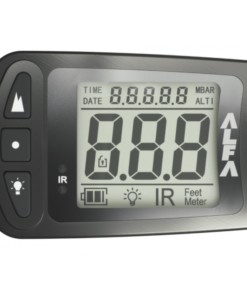


Alfa Military Altimeter – Tactical Digital Altitude Awareness for Military Freefall and Advanced Parachuting
Alfa Military Altimeter Overview
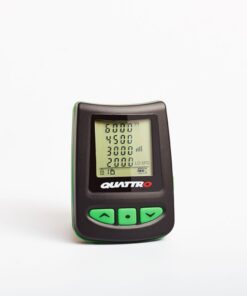
The Alfa Military Altimeter is a professional visual digital altitude instrument developed by LB Altimeters for trained parachutists and demanding tactical applications. Its high-contrast non-flickering LCD, electroluminescent backlight, shock-resistant aluminum housing, hardened glass, altitude-offset functionality, jump logging, and infrared communication capabilities make it particularly valuable where reliable altitude awareness must remain available in challenging environments. LB Altimeters also incorporates automatic ground-level calibration when the unit is switched on and software designed to correct altitude readings during normal operation.
Why Use the Alfa Military Altimeter?
Altitude awareness is fundamental whether someone is conducting a tracking jump, practicing canopy flight, participating in crw skydiving, or operating within an organized military parachuting program.
The large display is designed to make altitude information easy to interpret, while the backlight supports low-light and night operations. Furthermore, the unit records useful information including exit altitude, opening altitude, freefall duration, average speed, and maximum speed. Up to 200 jumps can be stored in the logbook, while data from the most recent jump can be replayed.
How Does the Alfa Military Altimeter Work?
The unit measures atmospheric pressure and converts those measurements into altitude information. When switched on at ground level, it performs a self-test and calibrates itself to the current location. Altitude offset can also be configured when operational conditions require another reference.
Therefore, it complements the broader skydiving equipment list rather than replacing other safety equipment.
A complete setup may include a parachute rig, container skydive system, reserve, main canopy, activation device, skydiving helmet, skydiver goggles, and emergency cutting equipment.
High-Visibility Display and Night Operations
The large LCD provides clear visual altitude information without the flicker associated with some digital displays.
An electroluminescent backlight is included for night operations. Battery condition is also displayed, and LB Altimeters specifically warns against night or sub-zero jumps when the battery indicator shows low capacity.
That makes battery inspection particularly important before demanding jumps.
Rugged Construction
The instrument uses a waterproof and shock-resistant aluminum casing combined with hardened glass.
That rugged construction is important when equipment is worn alongside a sky diving helmet, full face skydiving helmet, skydiving helmet full face, g35 helmet, cookie g4 helmet, or other skydive helmets.
Someone researching the best skydiving helmet or sky helmet skydiving options should remember that head protection and altitude instrumentation perform completely different jobs.
Jump Logging and Performance Data
The internal logbook records useful information from completed descents.
For experienced users evaluating skydiving speed or speed sky diving, recorded maximum and average freefall speed can provide useful post-jump information. The device also stores exit and opening altitude and freefall duration.
However, these records should complement training and debriefing rather than replace professional instruction.
Wingsuit and Advanced Freefall Applications
Altitude awareness remains important during wingsuit, wingsuit sport, vector wingsuit, gliding suit wingsuit, skydiving gliding suit, fly suits, or indoor wingsuit training.
Searches for wing suits for sale, price of wingsuit, or even tandem wingsuit concern separate equipment categories.
The altitude instrument does not control flight characteristics; instead, it supplies visual altitude information that the trained jumper can incorporate into established procedures.
Canopy and Rigging Context
Advanced equipment searches may include skydiving downsizing chart, smallest canopy, base canopy, safire 3, fluid wings, landing flight risers, linewear, freefly pud handle, and skydiving rigging.
These terms concern canopy selection, deployment, risers, container components, or maintenance rather than the digital instrument itself.
Similarly, anyone learning the parts of a parachute should treat the altimeter as personal flight instrumentation rather than part of the canopy-container assembly.
Emergency Equipment Is Separate
A hook blade knife, hook knife skydiving, or skydive hook knife serves an emergency cutting purpose and should not be confused with altitude instrumentation.
Likewise, fire parachute and cypress fire skydiving searches often concern other safety or emergency systems.
Each component has a distinct role, and professional equipment preparation should account for all of them individually.
BASE and Specialized Jumping
Terms such as base jumping and baseline jumping represent specialized disciplines requiring dedicated training and equipment.
The presence of a digital altitude display does not make an operation inherently safe.
The manufacturer warns that an altimeter can provide incorrect information when a jumper is tumbling or when the instrument is affected by aerodynamic wake. Visual altitude awareness and proper training remain essential.
Goggles and Vision Considerations
People researching skydiving glasses, skydiver goggles, or asking can you wear glasses while skydiving are generally concerned with visibility and eye protection.
A clear view of altitude information is important, so the instrument should be positioned where the trained user can read it efficiently without compromising established procedures.
Drop Zones and Recreational Searches
Searches including parachute jump australia, skydive byron bay, cairns skydiving, ifly colorado springs, skydiving blue hole belize, and skydive belize usually concern jump destinations or training facilities rather than this equipment.
Likewise, new skydive, skydiving website, and #skydiving latest are general discovery terms.
Users should always follow the procedures of their chosen training organization or operational unit.
Other Search Terms and Equipment Categories
The term weight limit skydiving relates to operator, harness, aircraft, and equipment restrictions rather than the altimeter.
A gear bag skydive product concerns transportation, while a skydiving tube may refer to completely different equipment.
Likewise, nude parachute jump and skydiving nude are unrelated to the technical function of this instrument.
Precision and Important Safety Information
The Alfa Military Altimeter is built to provide clear digital altitude information, but it must never be treated as an infallible source. LB Altimeters warns that altitude readings can be incorrect in certain aerodynamic conditions and instructs users to maintain independent visual altitude awareness. The instrument should also be switched on before boarding the aircraft.
For trained military and advanced parachuting personnel, its combination of automatic calibration, altitude offset, high-contrast display, night illumination, jump logging, speed recording, rugged housing, and infrared compatibility makes it a highly specialized tool for structured airborne operations.
Display Readability, Altitude Awareness, Jump Logging, Night Use, Mounting, and Real-World Operation
The Alfa Military Altimeter is designed to provide clear visual altitude information in a compact, rugged format that can be used during demanding airborne operations. Its usefulness comes from the combination of a readable digital display, automatic calibration, illumination, recorded jump data, pressure-based altitude sensing, and a housing intended to withstand repeated field use. However, the instrument is most effective when it is integrated into a disciplined operating routine rather than treated as the only source of altitude awareness.
Understanding the Main Display
The display is designed to present altitude information in a direct and easy-to-read format.
A large digital readout helps reduce the amount of time needed to interpret the instrument during freefall.
This matters because a jumper should be able to gather information quickly without staring at the display for too long.
The screen should be checked before boarding to confirm that all segments are working and that the information is clearly visible.
Automatic Ground Calibration
When switched on at ground level, the unit establishes a reference point for the current location.
This process allows subsequent altitude readings to be calculated relative to the configured ground reference.
The operator should therefore power the device on before departure rather than waiting until the aircraft is already climbing.
A correct starting reference supports more predictable altitude information later in the jump.
Altitude Offset Function
The altitude offset function adds flexibility when the intended landing area differs from the departure location.
Instead of assuming both locations share the same elevation reference, an offset can be applied according to the approved operational plan.
This is particularly useful for organized operations involving different terrain elevations.
The value should always be verified before use.
Incorrect offset information can create misleading altitude indications.
Pressure-Based Measurement
The instrument determines altitude through atmospheric pressure.
As altitude increases, atmospheric pressure decreases, and the device converts that change into a digital altitude reading.
Because weather conditions can influence atmospheric pressure, correct calibration remains important.
The instrument should also be allowed to stabilize when moved between environments with significantly different temperature or pressure conditions.
Display Readability in Freefall
Readability becomes especially important during fast movement.
The display should be positioned so the user can check it quickly without making large or unnecessary body movements.
Mounting position should support natural viewing.
If the user has to twist the wrist excessively or hold the device at an awkward angle, the mounting setup should be reconsidered.
Efficient readability reduces distraction.
Mounting Position
The instrument is typically worn where the user can see it easily while maintaining normal body position.
The exact placement may depend on personal equipment configuration and organizational procedure.
Whatever method is used, the instrument should remain secure.
It should not rotate freely or become hidden under clothing or equipment.
A stable mounting position improves consistency from one jump to the next.
Checking the Device Before Boarding
A pre-boarding check should confirm several basic items.
The display should be active.
Battery status should be acceptable.
The ground reference should be correct.
Any required offset should already be entered.
The mounting system should be secure.
The user should also confirm that the display remains easy to read under the expected lighting conditions.
Bright-Day Visibility
Bright sunlight can make some digital displays difficult to read.
The user should therefore check visibility outdoors rather than relying entirely on an indoor equipment room.
The viewing angle can also matter.
If the instrument is difficult to read because of reflection or glare, the mounting position may need slight adjustment.
Low-Light and Night Operation
The backlight allows the display to remain readable in low-light conditions.
Before a night operation, illumination should be tested.
The battery should also be checked carefully because cold temperatures and extended backlight use can influence battery performance.
The brightness should be sufficient for quick interpretation without becoming unnecessarily distracting.
Cold-Weather Performance
Cold conditions can affect electronic equipment and battery efficiency.
If the unit has been exposed to low temperatures, the user should confirm that the display remains responsive.
Battery condition should receive additional attention.
The instrument should also be protected from condensation when moving between cold and warmer environments.
Hot-Weather Performance
Excessive heat can also affect electronics.
The device should not be left in direct sunlight or inside a hot vehicle for extended periods.
Before use, the display should be checked for normal response.
Equipment that has become very hot should be allowed to stabilize before serious operation.
Managing Humidity
Humidity can create condensation on the display or housing.
The instrument should be kept dry whenever possible.
If moisture develops, it should be removed carefully before use.
After a damp operation, the unit should not be sealed immediately in a wet bag or pouch.
Dry storage helps protect the electronics and housing.
Jump Logging
The internal logbook adds useful post-operation value.
It can store information such as exit altitude, opening altitude, freefall duration, average speed, and maximum speed.
This allows the user to review previous activity without relying entirely on memory.
The data can also support structured debriefing and training review.
Reviewing Exit Altitude
Exit altitude provides useful context when analyzing a completed jump.
If the recorded value differs significantly from expectations, the user should consider whether the ground reference or operational plan changed.
This information should be reviewed alongside other flight data rather than in isolation.
Reviewing Opening Altitude
Opening altitude can help the user evaluate consistency across repeated jumps.
However, recorded information should never be treated as a substitute for established procedures.
The purpose of reviewing data is to understand performance after the event.
It should support training rather than encourage unnecessary changes to safe operating procedures.
Freefall Duration
Freefall duration can help explain how a jump developed.
A shorter or longer duration may reflect exit altitude, body position, deployment timing, or other factors.
Comparing several jumps can reveal patterns.
However, the number should always be interpreted within the context of the specific operation.
Average Speed Data
Average speed can be useful for post-jump analysis.
Different body positions and disciplines can produce different descent rates.
The recorded value can therefore help users compare activity across multiple jumps.
It should not be used as a reason to chase higher speed without appropriate training.
Maximum Speed Data
Maximum speed provides another reference point.
A high reading may reflect a short period of rapid descent rather than the entire freefall.
Therefore, it should be interpreted together with average speed and freefall duration.
Recorded speed data is most useful when it supports disciplined review.
Reviewing the Most Recent Jump
The ability to replay recent data can help with immediate debriefing.
The user can review information shortly after landing while the jump is still fresh in memory.
This can support better discussion with instructors or team leaders.
Immediate review is often more useful than trying to reconstruct events much later.
Recording Multiple Jumps
The logbook capacity allows repeated activity to be stored.
This can help users monitor patterns across training periods.
However, stored data should still be backed up or documented elsewhere if long-term records are important.
Electronic devices should not be assumed to provide permanent archival storage.
Battery Awareness
Battery condition should be part of every pre-use check.
The display should never be ignored if it shows reduced capacity.
Low battery can become especially important in cold conditions or during night use.
The user should replace the battery before the device reaches a condition where reliability becomes uncertain.
Avoiding Unnecessary Battery Drain
The device should not be left operating unnecessarily for long periods when it is not needed.
However, it should be powered on early enough to establish the correct ground reference before ascent.
The goal is to balance readiness with sensible battery management.
Interpreting Unusual Readings
An unexpected altitude reading should never be accepted automatically.
The user should compare it with visual awareness and other available references.
Rapid body movement, aerodynamic effects, incorrect calibration, or unusual pressure conditions can influence readings.
If the information does not make sense, the instrument should be treated as potentially unreliable until the situation is understood.
Tumbling and Aerodynamic Effects
Rapid rotation or unstable body position can expose the pressure sensor to irregular airflow.
This can cause temporary reading errors.
The user should therefore understand that digital precision does not eliminate aerodynamic limitations.
An electronic display can be accurate while still being affected by the environment around the sensor.
Using Visual Awareness
Visual altitude awareness remains essential.
The instrument should support, not replace, the user’s broader situational awareness.
Terrain, aircraft, other jumpers, canopy traffic, and environmental conditions all require attention.
A user who focuses only on the screen can miss important information.
Post-Landing Review
After landing, the device should be inspected for damage or contamination.
The stored jump data can then be reviewed.
If anything unusual occurred during the jump, the information should be compared with the user’s observations.
This combination of recorded data and personal awareness can improve debrief quality.
Reset and Preparation for the Next Use
Before the next operation, the user should confirm that the instrument has returned to the correct ground reference.
Any previous offset should be checked.
Battery status should be reviewed again.
The mounting system should also be inspected.
A repeatable reset process reduces the chance of carrying an old configuration into a new operation.
Practical Operational Value
The Alfa Military Altimeter performs best when it becomes part of a consistent operational routine.
Clear display readability supports fast altitude checks.
Automatic calibration establishes a usable reference.
Altitude offsets add flexibility when departure and landing areas differ.
Jump logging supports post-operation review.
Backlighting improves low-light usability.
Battery monitoring supports reliability.
Secure mounting keeps the instrument readable and accessible.
When these elements are combined with visual awareness, disciplined preparation, and proper training, the device becomes a highly practical support instrument for structured airborne operations.
Maintenance, Battery Care, Sensor Protection, Housing Inspection, Storage, and Long-Term Reliability
The Alfa Military Altimeter is a specialized electronic instrument, and dependable long-term performance depends on careful handling rather than aggressive maintenance. Its display, pressure-sensing system, battery compartment, housing, buttons, mounting points, internal electronics, and communication interface all need to remain clean, dry, secure, and undamaged. A consistent maintenance routine helps preserve reliability while also making it easier to identify faults before they affect operational use.
Building a Regular Inspection Routine
A short inspection should be completed before and after use.
The display should be checked for cracks, fading, missing segments, or unusual behavior.
Buttons should respond normally.
The housing should be inspected for impact damage.
The mounting system should remain secure.
Battery condition should also be reviewed.
This basic routine is simple, yet it can prevent many avoidable problems.
Cleaning the Exterior
The housing should be kept free from dirt, grease, and abrasive contamination.
A soft cloth is usually sufficient for routine cleaning.
Harsh chemicals should be avoided unless they are specifically approved for the materials used in the device.
The unit should not be submerged unnecessarily.
Cleaning should focus on removing contamination without forcing moisture into openings or seams.
Protecting the Display
The display is one of the most important components because the user depends on it for fast visual interpretation.
Scratches, cracks, or cloudy contamination can reduce readability.
The screen should therefore be cleaned gently with a suitable soft cloth.
Rough materials should be avoided.
During transport, the front surface should be protected from hard objects that could strike or scratch it.
Checking Display Response
The screen should activate normally and show clear information.
If the display begins flickering, fading, or producing incomplete characters, battery condition should be checked first.
If the problem continues, the unit should be removed from normal use until inspected.
A display that cannot be read reliably should never be treated as acceptable simply because the device still powers on.
Battery Management
Battery condition should be monitored routinely.
The user should know the approximate age of the installed battery and replace it before reliability becomes questionable.
Waiting until the device fails is poor maintenance practice.
Cold environments can reduce battery performance, so additional attention should be given before low-temperature use.
Avoiding Unexpected Power Failure
Unexpected shutdown can create serious inconvenience during preparation or operation.
The battery indicator should therefore be checked before use.
If power level appears low or uncertain, replacement is usually better than attempting to stretch the remaining capacity.
A fresh, correctly specified battery reduces uncertainty.
Long-Term Battery Storage
If the unit will remain unused for a long period, battery-storage guidance should be followed.
Depending on manufacturer recommendations, the battery may need to be removed during extended storage.
This can reduce the risk of leakage.
Before returning the device to service, the compartment should be inspected for corrosion, contamination, or damaged contacts.
Battery Compartment Inspection
The battery area should remain clean and dry.
Corrosion around contacts can interfere with power delivery.
If contamination appears, the device should be serviced appropriately rather than cleaned aggressively with unsuitable chemicals.
The battery cover should also remain secure so that moisture and debris are kept out.
Pressure Sensor Care
The pressure-sensing system should not be obstructed.
Dust, tape, grease, or debris around any sensing area can affect measurement quality.
The user should avoid covering openings with labels or accessories.
The instrument should also not be exposed unnecessarily to strong air jets or compressed-air cleaning.
Gentle external care is more appropriate.
Avoiding Blocked Sensor Openings
A blocked pressure path can interfere with altitude measurement.
The user should periodically inspect the exterior for contamination.
If the device has been used in dusty, muddy, or sandy environments, additional inspection is justified.
Any cleaning should be performed carefully.
Sharp objects should not be inserted into sensing openings.
Protecting the Housing
The housing is designed for demanding use, but it should still be protected from repeated impact.
The device should not be thrown loosely into bags with heavy metal equipment.
A protective pouch or dedicated storage location can reduce damage.
Even a strong housing cannot guarantee that the display or internal electronics will survive unlimited abuse.
Checking for Impact Damage
After a hard impact, the device should be inspected even if no external crack is visible.
Buttons, display response, battery cover, mounting points, and altitude function should all be checked.
Internal damage may not be obvious immediately.
A functional test is therefore important after significant impact.
Mounting-System Inspection
The mounting system should remain secure.
Straps, brackets, or attachment points should be inspected for wear.
A loose mount can allow the instrument to rotate into an unreadable position or become detached.
The user should confirm attachment security before every operation.
Avoiding Excessive Tightening
Mounting hardware should be secure, but excessive force should be avoided.
Overtightening can damage threads, brackets, straps, or the device housing.
The goal is firm and stable attachment, not maximum possible tension.
Button Care
Buttons should move and respond consistently.
A sticky or unresponsive button can indicate contamination or wear.
The user should not force it repeatedly.
If normal operation cannot be restored through approved external cleaning, professional inspection is preferable.
Communication Interface Maintenance
If the device uses infrared communication for configuration, the communication surface should remain clean and unobstructed.
Dust, oil, tape, or labels can interfere with transfer reliability.
The surface should be inspected and gently cleaned when needed.
A clear optical path supports more dependable programming.
Testing Configuration Communication
Communication with compatible programming equipment should be tested periodically.
If transfers begin failing, simple causes should be checked first.
Battery level, device alignment, communication distance, contamination, and obstruction can all contribute.
Testing with another known compatible unit can help determine where the problem lies.
Moisture Management
Moisture should be treated seriously.
If the device becomes wet, it should be dried before storage.
It should not be sealed inside a damp pouch or bag.
Humidity can remain trapped around electronic equipment for long periods.
Drying the device and storage container separately is often better.
Condensation Control
Condensation can develop when moving from a cold environment into a warm one.
The device should be allowed to adjust gradually.
If condensation appears on the display or housing, it should be allowed to evaporate before normal use.
Repeated rapid temperature changes should be minimized where possible.
Heat Protection
Excessive heat can affect batteries, displays, seals, and electronics.
The device should not be left for long periods in direct sunlight or inside a closed hot vehicle.
If it has become very hot, it should be allowed to return gradually to normal temperature before use.
Cold-Weather Care
Cold weather can reduce battery output and make electronic displays respond more slowly.
The user should verify battery condition and screen responsiveness before use.
Equipment should also be kept dry because cold-weather condensation can create additional problems.
Dust and Sand Exposure
Fine particles can collect around buttons, seams, and mounting points.
After use in dusty conditions, the exterior should be cleaned carefully.
The device should not be blasted with compressed air because that may force particles deeper into openings.
Gentle cleaning is safer.
Saltwater and Coastal Environments
Salt residue can be particularly corrosive.
If the device is exposed to salty air, spray, or coastal conditions, the exterior should be cleaned according to manufacturer guidance.
Salt should not be allowed to remain on metal surfaces.
Storage should be dry.
Storage Between Uses
The device should be stored in a stable, dry environment.
It should remain protected from direct sunlight, heavy equipment, high humidity, and extreme temperature.
A dedicated padded location reduces the chance of accidental damage.
The battery should also be checked periodically during long storage.
Transport Protection
During transport, the instrument should not move freely inside a bag.
Heavy objects should not rest on the display.
A protective pouch can help absorb impact and prevent scratches.
The device should also remain easy to locate quickly during equipment preparation.
Verifying Function After Storage
Any unit that has been stored for an extended period should be fully tested before operational use.
The display, battery, buttons, calibration process, mounting system, and communication interface should all be checked.
A successful power-on alone is not enough.
Functional verification provides greater confidence.
Recognizing Unusual Altitude Behavior
Unexpected readings should be investigated.
The user should compare the device with other available references.
If the altitude display behaves inconsistently while stationary, the unit may need inspection.
Environmental changes should be considered, but repeated unexplained errors should not be ignored.
Avoiding Unnecessary Internal Repairs
Internal servicing should not be improvised.
Opening the housing unnecessarily can compromise seals, introduce dust, or damage electronics.
If internal malfunction is suspected, qualified service is preferable.
External inspection and functional testing are the most appropriate routine maintenance actions.
Professional Service
Professional servicing should be considered when the device shows repeated communication failure, display problems, inaccurate readings, unreliable controls, battery-contact corrosion, or impact damage.
A technician can determine whether the instrument can be repaired safely or should be replaced.
Maintaining Service Records
A simple service record can improve equipment management.
Battery changes, impact events, communication faults, display problems, and professional repairs can all be documented.
This helps identify patterns and makes future troubleshooting easier.
Long-Term Reliability
The Alfa Military Altimeter can remain dependable for many years when it is treated as precision electronic equipment.
Battery management prevents unexpected shutdown.
Clean sensor areas support accurate measurement.
Protected storage reduces impact damage.
Dry handling protects electronics.
Secure mounting preserves usability.
Regular functional testing makes developing problems easier to identify.
With consistent care, careful transport, and timely professional servicing, the instrument can continue to provide clear altitude information and reliable operational support across repeated use.
Mission Preparation, Environmental Performance, Operational Workflow, Situational Awareness, and Performance Optimization
The Alfa Military Altimeter delivers its greatest value when it becomes part of a disciplined preparation and monitoring routine. Its digital display, pressure-based altitude measurement, backlight, memory functions, rugged housing, and programmable reference settings provide useful support, but effective use still depends on correct setup, proper mounting, environmental awareness, and regular cross-checking. The instrument should be treated as one component within a broader system of training, visual awareness, equipment preparation, and operational planning.
Preparing the Instrument Before Departure
A consistent pre-departure routine should begin well before boarding.
The user should confirm battery condition, display clarity, mounting security, reference settings, and any required offset.
The device should be powered on early enough to establish its correct ground reference.
If the environment or landing location requires a different reference, that value should already be confirmed through the approved operational plan.
Last-minute guesswork should be avoided.
Confirming the Ground Reference
The initial ground reference affects everything that follows.
The user should therefore confirm that the device has stabilized correctly before ascent.
If the reference appears unusual, the problem should be investigated before departure.
A correct starting point supports reliable interpretation later.
An incorrect reference can make otherwise accurate pressure measurements misleading.
Managing Altitude Offsets
Altitude offset becomes particularly important when departure and landing areas are not at the same elevation.
The selected offset should come from verified mission information.
It should not be based on memory or rough estimation.
Once entered, the value should be reviewed carefully.
If several instruments are being prepared for the same operation, configuration consistency should be confirmed across the group.
Positioning the Display for Fast Reading
The display should be mounted where it can be viewed with minimal movement.
The user should not need to rotate the arm excessively or change body position dramatically to read it.
A natural viewing angle reduces distraction.
The mounting position should also remain stable during movement.
If the instrument shifts easily, it should be secured before use.
Checking Visibility in Real Conditions
Indoor visibility does not always represent outdoor visibility.
The display should be checked under lighting conditions similar to those expected during the operation.
Bright sunlight can create glare.
Low light may require illumination.
The user should confirm that the display remains easy to interpret quickly in both conditions.
Managing Backlight Use
The backlight should be used deliberately.
In dark conditions, enough illumination should be selected to make the display readable.
However, excessive brightness may be distracting.
Battery consumption should also be considered.
A practical setting balances visibility with power efficiency.
Cold-Weather Operations
Cold temperatures can affect both the battery and electronic response.
Before a cold-weather operation, the user should verify that the display remains responsive and that battery capacity is sufficient.
The instrument should also be protected from unnecessary exposure when not in use.
If it has been moved from a warm environment into extreme cold, a brief stabilization period may be useful.
Hot-Weather Operations
High temperature creates different concerns.
The instrument should not be left unnecessarily in direct sunlight or inside a hot vehicle.
Excessive heat can affect batteries and electronic components.
Before use, the display and controls should be checked.
If the unit has become very hot, it should be allowed to return toward a normal operating temperature.
Managing Condensation
Rapid temperature changes can cause condensation.
This may occur when moving between cold and warm environments.
If moisture forms on the display or housing, the unit should be allowed to dry before use.
The device should not be sealed inside a damp pouch.
Moisture management helps preserve both readability and long-term reliability.
Monitoring During Ascent
During ascent, the user should occasionally confirm that the display is behaving as expected.
Altitude should increase in a logical manner.
An obviously frozen or erratic reading should be treated as a warning sign.
The device should never be assumed to be correct simply because it is powered on.
Maintaining Situational Awareness
The instrument should support awareness rather than dominate attention.
The user still needs to monitor the surrounding environment.
Equipment, aircraft procedures, other personnel, terrain, and operational instructions all require attention.
Repeatedly staring at the display can reduce broader situational awareness.
Quick, deliberate checks are more appropriate.
Cross-Checking Information
When other reliable altitude references are available, they can provide useful context.
A major disagreement between instruments should be taken seriously.
The user should not automatically assume that one reading is correct.
Unexpected information should be evaluated carefully, especially if it differs from visual or operational expectations.
Understanding Aerodynamic Effects
Pressure-based instruments can be influenced by airflow around the sensor.
Unusual body position or turbulent airflow may temporarily affect readings.
The user should understand this limitation.
A digital display can appear precise while still being influenced by the surrounding airflow.
Situational awareness remains essential.
Freefall Readability
During rapid descent, information must be easy to interpret.
The user should avoid complicated display interaction.
The instrument should already be configured correctly before departure.
The goal during descent is to obtain information quickly, not to navigate menus.
Preparation therefore directly improves practical usability.
Managing High-Speed Conditions
Higher descent speeds can increase aerodynamic effects around the instrument.
The user should avoid interpreting every rapid display change as a permanent measurement error.
Short-term fluctuations should be considered in context.
Stable body position can help produce more reliable readings.
Low-Speed Descent Conditions
During slower descent, the instrument may be easier to read and interpret.
However, the user should still maintain disciplined checking.
A slower rate of descent does not eliminate the need for awareness.
The same principles of visual cross-checking and reference confirmation still apply.
Transitioning Between Phases
Different phases of descent require different attention.
The user may rely more heavily on altitude information during some periods and more on visual awareness during others.
The instrument should support these transitions without demanding unnecessary interaction.
A clear display and stable mounting position help make this possible.
Reviewing Information After Landing
Post-operation review can provide useful insight.
Stored data can be checked against the user’s memory of the event.
Exit altitude, opening altitude, duration, and speed information may help explain how the operation developed.
This information is most useful when combined with disciplined debriefing.
Comparing Recorded Data
One data point should not be treated as a complete performance assessment.
Several recorded events can provide a more useful pattern.
Consistent differences may indicate changes in technique, environment, or equipment configuration.
The user should review trends rather than focusing only on one unusual reading.
Documenting Unusual Events
If the instrument behaves unexpectedly, the event should be recorded.
The user can note environmental conditions, battery status, reference settings, and any unusual display behavior.
This information can help during troubleshooting.
Repeated issues become easier to identify when they are documented.
Managing Battery Consumption
Battery life should be considered during long training periods or repeated operations.
Frequent backlight use and cold conditions can reduce available capacity.
The user should check the indicator regularly rather than waiting for a warning at the last moment.
A predictable replacement schedule can reduce uncertainty.
Preparing for Multiple Uses in One Day
Repeated use requires efficient reset procedures.
The ground reference should be checked again before each new operation.
Battery condition should be reviewed.
Mounting security should also be confirmed.
Assuming that the setup remains unchanged after several hours can lead to avoidable problems.
Transport Between Locations
When moving between operational areas, the device should remain protected.
The display should not be exposed to unnecessary impact.
The mounting strap and housing should also be checked after travel.
If elevation changes significantly between locations, a new reference should be established.
Adapting to Different Terrain
Mountainous or uneven terrain can make altitude interpretation more complex.
A device can provide accurate information relative to its reference while the actual ground below varies significantly.
The user should therefore understand the relationship between instrument reference and surrounding terrain.
Training and operational planning remain essential.
Coastal and Humid Environments
Coastal air can introduce salt and moisture.
The housing should be cleaned after exposure.
The device should then be dried before storage.
Salt residue should not be left on metal surfaces.
Regular care becomes especially important in these environments.
Dusty and Sandy Environments
Fine particles can collect around buttons, seams, and sensor areas.
The device should be inspected after exposure.
Cleaning should remain gentle.
Compressed air or sharp tools should not be used aggressively around sensitive openings.
Team Standardization
When several users are operating together, consistent settings can simplify communication.
The team should understand which reference and configuration are being used.
This reduces confusion during briefing and review.
A standardized approach also makes equipment checks more efficient.
Training New Users
New users should become familiar with the display and controls in a controlled environment before relying on the device during a demanding operation.
Training should include startup, reference checking, backlight use, offset verification, battery monitoring, and post-operation review.
Familiarity reduces hesitation.
Avoiding Over-Reliance on Electronics
Electronic instruments are useful, but they are not infallible.
Battery failure, sensor effects, incorrect configuration, or physical damage can all affect performance.
The user should maintain broader awareness and follow established procedures.
Technology should support judgment rather than replace it.
Practical Performance Optimization
The Alfa Military Altimeter performs best when preparation, mounting, reference management, environmental awareness, and disciplined checking are all combined.
Correct calibration provides a reliable starting point.
Stable mounting improves readability.
Backlight management supports low-light use.
Battery monitoring reduces unexpected failure.
Environmental awareness helps explain unusual readings.
Post-operation review supports learning and equipment assessment.
When these practices become routine, the instrument becomes a dependable and efficient support tool for structured airborne operations.
Be the first to review “Alfa Military Altimeter”
Related products

Altimeter
Altimeter


Altimeter

Altimeter
Reviews
There are no reviews yet.