





Altiset II Military – Handheld IR Programming Remote for Tactical Skydiving Altimeters
Altiset II Military Overview
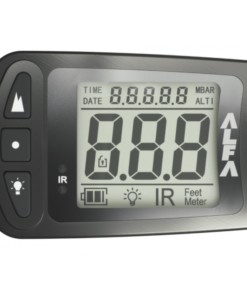
The Altiset II Military is not a firearm and it is not itself the jumper’s primary altimeter. Instead, it is a compact handheld infrared programming unit developed for configuring compatible LB Altimeters tactical equipment. It allows a Jump Master, Load Master, or mission commander to apply mission-specific settings to compatible devices such as the ALFA, ECHO, and Military ALTITRACK. That centralized control can reduce setup variation across a group before an operational parachute jump.
For military and specialized parachuting environments, the unit provides a practical way to change pressure references and selected settings without manually configuring every compatible instrument individually.
Why Use the Altiset II Military?
The primary reason is standardized equipment preparation.
A Jump Master can establish required settings and then transmit them to compatible devices through infrared communication. Available functions include mBar pressure adjustment and backlight control, while compatible ECHO units can also receive warning-related settings.
This becomes particularly useful when preparing multiple jumpers for a tracking jump, tactical descent, canopy flight, or other organized operation where consistent altitude information is essential.
How Does the Altiset II Military Work?
The device communicates through IrDA and requires line-of-sight between the programming unit and the compatible instrument. Para Gear lists an effective programming distance of approximately 30 cm / 10 inches. The jumpmaster selects the desired parameters on the OLED interface and transmits them to compatible equipment before or during mission preparation.
It can therefore support a jumper pilot team, instructors, and rigging personnel without becoming part of the parachute rig itself.
Rugged Construction for Operational Use
The housing is made from precision-machined aircraft-grade aluminum, while the front uses a high-impact etched glass lens. The compact unit can be carried in a pouch, stored aboard an aircraft, or kept on the belt or equipment of the responsible jumpmaster.
That construction is useful whether the operation involves traditional military parachuting, base jumping training contexts, baseline jumping discussions, or specialized freefall preparation.
Where Does It Fit Within a Skydiving Equipment List?
A complete skydiving equipment list may include a container skydive system, main and reserve canopy, automatic activation device, helmet, altimeter, goggles, jumpsuit, emergency cutting tool, and accessories.
The Altiset II belongs to the equipment-management side rather than being a component of the parts of a parachute.
It does not replace a skydiving helmet, skydive helmets, full face skydiving helmet, sky diving helmet, skydiving helmet full face, g35 helmet, cookie g4 helmet, or the best skydiving helmet selected for an individual jumper.
Likewise, it is not a hook blade knife, hook knife skydiving, or skydive hook knife. Those tools serve completely different emergency functions.
Pressure Settings and Different Landing Zones
One of the most important operational advantages is the ability to adjust mBar settings when the takeoff location and intended landing area differ in atmospheric pressure or elevation.
Para Gear specifically notes that the system can help configure military altimeters for accurate readings when the landing zone is far from the original takeoff location.
That capability becomes particularly relevant when planning demanding missions where landing flight risers, canopy procedures, and accurate altitude awareness must be carefully managed.
Altitude Awareness and Safety
The manufacturer warns that compatible equipment is intended as a backup source of altitude awareness rather than the jumper’s sole means of maintaining altitude awareness. The manual also notes that altimeter readings can be affected by tumbling or by aerodynamic wake.
Those warnings matter whether a jumper is researching skydiving speed, speed sky diving, smallest canopy, skydiving downsizing chart, crw skydiving, base canopy, or advanced fluid wings canopy designs.
Correct training and equipment selection remain essential.
Compatibility With Other Skydiving Equipment
The Altiset II Military works with compatible LB tactical instruments rather than every piece of parachuting equipment on the market.
Therefore, products or searches involving safire 3, a parachute rig, skydiving rigging, linewear, freefly pud handle, gear bag skydive, or fire parachute represent different equipment categories.
Likewise, terms such as cypress fire skydiving generally relate to automatic activation equipment and should not be confused with an altimeter-programming remote.
Wingsuit and High-Speed Applications
Experienced jumpers researching wingsuit, wingsuit sport, vector wingsuit, gliding suit wingsuit, skydiving gliding suit, wing suits for sale, price of wingsuit, tandem wingsuit, indoor wingsuit, or fly suits should recognize that altitude awareness remains important regardless of freefall discipline.
However, this programming unit does not control a wingsuit.
It configures compatible tactical altitude instruments used by trained jumpers.
Goggles, Glasses, and Helmet Integration
Searches such as skydiving glasses, skydiver goggles, and can you wear glasses while skydiving concern eye protection and helmet compatibility rather than the Altiset II.
Similarly, helmet selection depends on visibility, fit, communication needs, discipline, and training requirements.
The programming remote remains separate from those protective systems.
Drop Zones and Training Locations
People searching parachute jump australia, skydive byron bay, cairns skydiving, ifly colorado springs, skydiving blue hole belize, or skydive belize are usually looking for locations or experiences rather than military equipment.
Likewise, searches such as new skydive, skydiving website, and #skydiving latest may surface general industry information rather than technical Altiset II specifications.
The remote is aimed at organized tactical-altimeter management, not commercial tandem booking.
Weight, Canopy Selection, and Operational Planning
Terms such as weight limit skydiving relate to jumper, equipment, aircraft, and operator limits.
Meanwhile, canopy decisions involving the smallest canopy, downsizing, or high-performance canopy flight require formal training and should never be based solely on search results.
The Altiset II supports configuration consistency, but it does not calculate safe canopy size or replace instructor judgment.
Unrelated Search Terms
Some keyword sets contain unrelated searches such as nude parachute jump, skydiving nude, or skydiving tube. These do not describe features of this product.
Likewise, the Altiset II should not be confused with recreational apparel, novelty jumps, canopy fabric accessories, or general-purpose equipment.
Why the Altiset II Military Is Important
The Altiset II Military is valuable because it allows one authorized operator to standardize compatible altitude equipment across multiple jumpers efficiently.
Instead of manually changing each instrument independently, the mission commander can transmit pressure, backlight, altitude, and supported warning parameters using a compact handheld device.
For military parachuting teams, that can simplify preparation, reduce configuration errors, and improve consistency across an entire aircraft load.
Its aircraft-grade aluminum construction, compact form, OLED interface, infrared communication, and compatibility with multiple tactical instruments make it a specialized but highly practical tool for disciplined parachuting operations.
Operational Setup, Programming Workflow, Display Control, Team Coordination, and Mission Preparation
The Altiset II Military is most useful when it is treated as a dedicated configuration tool rather than a general-purpose flight instrument. Its role is to help authorized personnel prepare compatible altitude devices before an operation by applying selected settings in a controlled, repeatable way. The value of the unit comes from consistency: one operator can establish the required parameters, verify them, and then apply the same configuration across multiple compatible devices before boarding or deployment.
Preparing the Unit Before Use
Before programming begins, the operator should inspect the device for visible damage, contamination, or anything that could interfere with normal operation.
The display should be readable.
The controls should respond correctly.
The infrared communication area should remain clean and unobstructed.
If the unit has been transported in a crowded equipment case, a brief inspection is especially useful.
A simple pre-use check helps reduce delays later.
Verifying Power Status
The unit should have adequate battery power before a configuration session begins.
Programming several devices shortly before departure is not the ideal time to discover that battery capacity is low.
The operator should therefore verify power status in advance.
Where spare power options are available, they should be kept with the support equipment rather than stored separately.
Preparation is more reliable when power management is part of the normal equipment checklist.
Understanding the Programming Workflow
A disciplined programming sequence improves consistency.
The operator should first determine the settings required for the operation.
Those values can then be entered into the unit.
After that, each compatible device can be programmed individually.
The receiving device should be checked after transmission so the operator can confirm that the intended values were accepted.
This process is more dependable than assuming every transfer was successful.
Maintaining Line of Sight
Infrared communication requires a clear path between the programming unit and the receiving device.
The two units should be positioned correctly and kept within the recommended operating distance.
Objects, clothing, equipment, or hands should not block the communication path.
The operator should also avoid unnecessary movement during transfer.
A stable position makes communication more reliable.
Managing Multiple Devices
The strongest practical advantage appears when several compatible instruments need the same configuration.
Instead of moving through different menus independently on every device, the operator can establish the desired parameters once and then repeat the transfer process.
This can reduce setup variation.
It can also make pre-operation checks easier because the team is working from one standardized configuration plan.
Creating a Device Order
When many instruments are being programmed, order matters.
The operator can arrange them in a clear sequence before starting.
Completed units should be separated from those still waiting for configuration.
This reduces the risk of programming the same device twice while accidentally missing another.
A simple left-to-right or numbered workflow can make the process more efficient.
Confirming Pressure Reference Settings
Atmospheric pressure settings should be established carefully.
The correct value depends on the operational plan and reference system being used.
The operator should not enter values from memory if reliable briefing information is available.
Once entered, the setting should be reviewed before it is transmitted.
A single incorrect reference value can be copied across several devices very quickly, so verification before transfer is essential.
Managing Different Landing Elevations
Operations that begin and end at significantly different elevations require additional attention.
The intended reference should be determined before programming begins.
The operator should understand whether the devices are being configured for the departure location, the destination, or another operational reference.
These decisions should follow the established mission plan.
The programming tool helps apply the setting consistently, but it does not replace operational planning.
Backlight Configuration
Backlight control can be useful in different lighting environments.
A bright display may be appropriate in some conditions, while a lower level may be preferable where preserving night vision matters.
The operator should choose a setting that balances readability with operational requirements.
The selected level should also be checked on the actual receiving device.
A setting that appears suitable indoors may look different in a darker or brighter environment.
Low-Light Preparation
Low-light operations demand more careful preparation.
Displays should remain readable without becoming excessively distracting.
Personnel should familiarize themselves with the configured brightness before movement begins.
This reduces the chance that someone will attempt to change settings at an inconvenient time.
Pre-configuration is particularly useful when equipment must remain standardized across a group.
Daylight Preparation
Bright daylight creates a different challenge.
The operator should confirm that displays remain legible under the expected conditions.
If devices have adjustable backlighting or contrast-related behavior, those settings should be checked outside the planning room where possible.
Equipment should be evaluated in conditions similar to actual use.
This makes the configuration more practical.
Warning Configuration
Where compatible devices support additional warning parameters, those settings should be selected carefully.
The operator should know exactly what each alert represents.
Warning values should not be entered arbitrarily.
They should follow the operational plan and relevant training doctrine.
The programming unit can make distributing those settings easier, but the responsibility for selecting correct values remains with the operator.
Verifying Each Transfer
Every programming action should be followed by confirmation.
The operator should check the receiving instrument rather than assuming that a transmission succeeded.
This is especially important when several devices are handled quickly.
A visual verification step adds only a small amount of time but can prevent configuration mistakes.
Avoiding Rushed Setup
Pre-operation preparation can become busy, especially when personnel and equipment are moving at the same time.
However, programming should not be rushed.
One incorrect value can affect multiple devices if it is transmitted repeatedly.
The operator should complete the setup before pressure to board or move becomes excessive.
A calm workflow is generally faster overall because it reduces the need for corrections.
Standardizing Team Configuration
Standardization is one of the main operational benefits.
When every compatible instrument uses the same intended reference settings, team members receive more consistent information.
This simplifies briefing and reduces uncertainty.
The operator can also communicate clearly which configuration has been applied.
Consistency becomes especially useful when several people are working together under the same operational plan.
Recording Programmed Values
A written or digital record can improve accountability.
The operator can note the pressure reference, backlight level, warning settings, date, and devices configured.
This provides a reference if a question arises later.
It also helps identify whether a later change was part of the original setup or occurred afterward.
Labeling Equipment
Where organizational procedures allow, equipment should be clearly identified.
A serial number, user assignment, or equipment identifier can help prevent confusion.
The programming record can then be matched to the correct device.
This becomes more important when several instruments look identical.
Working With Instructors and Team Leaders
The operator responsible for programming should coordinate with the person responsible for the overall operation.
Configuration values should come from the approved briefing or operational plan.
If there is uncertainty, it should be resolved before settings are transmitted.
The programming unit is a technical tool, but correct use still depends on communication between personnel.
Managing Last-Minute Changes
Operational conditions can change.
If a pressure reference, landing location, or warning setting must be updated, the operator should repeat the complete verification process.
Old values should not be partially modified from memory.
The new configuration should be entered, checked, transmitted, and confirmed.
A systematic approach reduces the risk of mixing old and new settings.
Environmental Considerations
Extreme temperatures can affect electronic equipment.
The unit should not be left unnecessarily in direct sunlight, freezing conditions, or other harsh environments.
If it has been moved between significantly different temperatures, it should be allowed to stabilize before use.
Condensation should also be avoided because moisture can interfere with electronics.
Protecting the Display
The front display and glass should remain free from scratches and contamination.
Dust can be removed with a soft cloth.
Harsh chemicals should not be used unless approved for the device.
A damaged or difficult-to-read display can slow programming and increase the chance of entering incorrect values.
Protecting the Infrared Interface
The communication area should remain clean.
Oil, dirt, tape, labels, or other obstruction can interfere with transfer reliability.
The operator should inspect it before a large programming session.
A quick cleaning can prevent repeated failed transmissions.
Transporting the Unit
The device should be protected during transport.
A pouch or padded storage area can reduce impact damage.
It should not be placed loose with heavy metal equipment that could scratch the display or housing.
The compact size makes it easy to carry, but that also makes it easy to misplace.
A designated storage location helps.
Post-Programming Check
After all devices have been configured, the operator should perform a final review.
Each instrument should be accounted for.
The intended settings should be confirmed.
Any device that behaved differently during programming should receive additional attention.
This final check acts as a quality-control step before the equipment is issued or used.
Post-Operation Handling
After use, the unit should be inspected and stored properly.
Any moisture, dust, or dirt should be removed.
Battery condition should be checked if another operation is expected soon.
The device should then be returned to its designated protective storage location.
Training New Operators
New users should learn the programming workflow before they are expected to configure multiple devices under time pressure.
Practice should include selecting values, transmitting them, confirming reception, correcting an error, and organizing several instruments.
Training builds familiarity with the interface and reduces hesitation.
Practical Operational Value
The Altiset II Military is most effective when integrated into a disciplined preparation process.
Accurate setting selection comes first.
Clear line-of-sight supports reliable communication.
Verification confirms successful transfer.
Equipment labeling reduces confusion.
Written records improve accountability.
Team coordination ensures that everyone is working from the same operational plan.
When these habits are combined, the unit becomes a practical tool for improving consistency across compatible altitude instruments while reducing repetitive manual setup and unnecessary configuration variation.
Maintenance, Battery Care, Display Protection, Infrared Reliability, Storage, and Long-Term Serviceability
The Altiset II Military is a specialized electronic configuration device, so long-term reliability depends on careful handling rather than complex maintenance. Its housing, display, buttons, battery system, infrared interface, internal electronics, and protective surfaces should all remain clean, dry, and free from unnecessary impact. Because the unit may be used during time-sensitive preparation, small faults can create delays if they are ignored. A consistent maintenance routine helps preserve dependable operation and makes it easier to identify changes before they become serious.
Building a Routine Inspection Process
A simple inspection should be completed before and after use.
The operator should check the housing, screen, buttons, battery status, and communication window.
Any unusual looseness, damage, moisture, or contamination should be noted immediately.
The device should also be switched on briefly to confirm that the display and controls respond normally.
Regular light inspection is more effective than waiting for a fault to appear during an important setup session.
Keeping the Housing Clean
The outer housing should remain free from heavy dirt, grease, and abrasive contamination.
A soft cloth is usually sufficient for routine cleaning.
Harsh solvents should be avoided unless they are specifically approved for the materials used in the device.
The unit should not be submerged or sprayed directly with liquid.
Cleaning should always focus on removing contamination without forcing moisture into seams or openings.
Protecting the Display
The front display is one of the most important user interfaces.
Scratches, cracks, or contamination can make settings harder to read.
The screen should therefore be protected during transport and storage.
Cleaning should be gentle.
A soft microfiber cloth is preferable to rough materials that may damage the surface.
If the display becomes difficult to read even after cleaning, the device should be inspected before continued operational use.
Checking Button Response
The controls should respond consistently.
A button that becomes sticky, unusually loose, or difficult to press may indicate contamination or wear.
The operator should not force a control that no longer feels normal.
Repeated excessive pressure can worsen the problem.
If the interface becomes unreliable, the device should be serviced rather than used in a condition where incorrect input could occur.
Battery Management
Battery condition should be monitored routinely.
The device should not be stored for long periods with a nearly exhausted power source if this can be avoided.
Before a major configuration session, power level should be checked.
If the design allows battery replacement, only the correct type should be used.
Incorrect batteries can create unreliable operation or damage.
Preventing Unexpected Power Loss
Unexpected shutdown during configuration can cause confusion.
The operator should therefore avoid beginning a large programming sequence with uncertain battery condition.
A practical approach is to verify power before equipment setup begins.
Where organizational procedures allow, spare power supplies should be kept with the support kit.
This reduces delays and helps maintain a predictable workflow.
Long-Term Battery Storage
If the device will not be used for an extended period, battery-storage guidance should be followed.
Some electronics benefit from battery removal during very long storage, particularly if leakage is a concern.
However, the exact approach should follow manufacturer recommendations.
Before returning the unit to service, the battery compartment should be inspected for corrosion or contamination.
Protecting the Infrared Interface
The infrared communication area must remain clean and unobstructed.
Dust, oil, tape, labels, or residue can interfere with signal transfer.
The surface should be inspected periodically and cleaned gently.
Because communication depends on a clear optical path, even minor contamination can sometimes create unreliable operation.
Testing Communication Reliability
Communication should be tested periodically with a known compatible device.
The operator should confirm that settings can be transmitted and received normally.
If communication begins failing repeatedly, several factors should be checked.
Distance, alignment, obstruction, receiver condition, battery level, and contamination can all contribute.
Troubleshooting should begin with the simplest possible causes.
Avoiding Unnecessary Internal Disassembly
Internal electronics should not be opened without a clear service reason.
Unnecessary disassembly can introduce dust, moisture, static damage, or sealing problems.
If an internal fault is suspected, qualified service is preferable.
The device is more likely to remain reliable when routine maintenance focuses on external care and controlled diagnostics.
Managing Moisture Exposure
Moisture should be treated seriously.
If the device becomes wet, it should be dried before storage.
It should not be sealed immediately inside a damp pouch.
Condensation can also form when the unit is moved between cold and warm environments.
Allowing it to stabilize gradually can reduce this risk.
Humid Environment Care
High humidity can affect electronics over time.
The device should be stored in a dry location whenever possible.
Protective cases should also be checked because moisture can remain trapped inside them.
A dry storage environment helps protect contacts, electronic components, and the display assembly.
Temperature Management
Extreme heat and cold should be avoided.
A closed vehicle can become very hot, while exposed equipment in cold conditions may become less responsive.
Rapid temperature changes can also create condensation.
The device should be allowed to acclimate before use if it has been stored in a significantly different environment.
Impact Protection
Although the housing is robust, the unit should still be protected from unnecessary impacts.
It should not be dropped deliberately or stored loose among heavy equipment.
Repeated impact can damage the display, buttons, battery compartment, or internal electronics.
A protective pouch or dedicated compartment is therefore recommended.
Transport Organization
The device should have a consistent transport location.
A dedicated pouch, pocket, or equipment compartment reduces the chance of loss.
It also prevents the unit from moving around freely during transport.
The operator should know exactly where the device is stored so that it can be accessed quickly during preparation.
Cable and Accessory Management
If accessories are used with the unit, they should be stored together.
Loose accessories can easily be misplaced.
They should be inspected for damage before use.
Keeping all related items in one organized kit simplifies preparation and reduces delays.
Labeling the Device
Where organizational procedures permit, the unit can be labeled with an equipment number or ownership identifier.
This is useful when several similar devices are in circulation.
Clear identification reduces confusion during issue, return, and maintenance tracking.
Labels should not cover the display, buttons, or communication area.
Recording Maintenance Events
A simple service record can be useful.
The operator or equipment manager can note battery replacement, unusual communication failures, display issues, cleaning, and professional servicing.
This creates a history of the device.
If a problem begins recurring, previous records can help identify when it first appeared.
Monitoring Repeated Communication Failures
Repeated transmission failure should not be ignored.
If alignment and distance are correct, the operator should inspect both the programming unit and the receiving instrument.
Battery condition should also be checked.
Testing with another compatible unit can help identify which device is causing the problem.
A structured process is more effective than repeatedly attempting the same transmission without diagnosis.
Display Problems
A fading, flickering, or partially unreadable display may indicate a power or hardware issue.
Battery condition should be checked first.
If the problem remains after power has been confirmed, the unit should be removed from active service until inspected.
A display that cannot be read reliably increases the chance of incorrect settings being entered.
Unexpected Control Behavior
Controls should respond in a predictable way.
If menu movement becomes erratic or a button activates multiple functions unexpectedly, the unit should be checked.
The operator should not continue using a device that produces uncertain input.
Reliable programming depends on knowing exactly which setting has been selected.
Verifying Function After Storage
A device that has been stored for a long period should be tested before operational use.
The battery, display, controls, and communication function should all be checked.
A simple functional test can reveal issues caused by storage conditions.
This is especially important if the unit has not been used for several months.
Cleaning After Field Use
After use in dusty or dirty environments, the exterior should be cleaned before storage.
Dirt should not be allowed to accumulate around buttons or seams.
The communication surface should be checked carefully.
Cleaning should remain gentle and dry whenever possible.
Avoiding Improvised Repairs
Improvised repairs can create larger problems.
Tape placed over communication surfaces, incorrect replacement parts, or unauthorized internal modifications can reduce reliability.
If a component is damaged, proper repair is preferable.
The device is most dependable when it remains in its intended configuration.
Professional Service
Professional inspection is appropriate when the device develops persistent faults.
Examples include repeated communication failure, damaged controls, unreliable display behavior, internal corrosion, or physical damage.
A technician can determine whether repair or replacement is the safer option.
Long-Term Storage
For extended storage, the unit should be clean, dry, and protected.
It should be kept away from direct sunlight, excessive heat, high humidity, and heavy equipment.
The storage location should also reduce the chance of accidental impact.
Before future use, the device should be fully inspected again.
Preserving Operational Readiness
The strongest maintenance strategy focuses on readiness.
The device should power on correctly.
The controls should respond predictably.
The screen should remain readable.
The communication system should function reliably.
The battery should provide adequate operating time.
When these basic requirements are checked consistently, the Altiset II Military can remain dependable across repeated equipment-preparation cycles.
Long-Term Reliability
The Altiset II Military is designed as a specialized support tool, and its value depends on being ready when needed.
Clean handling protects the interface.
Dry storage protects the electronics.
Battery management reduces unexpected shutdowns.
Communication testing confirms dependable operation.
Protective transport reduces impact damage.
Maintenance records support troubleshooting.
With careful handling, regular functional checks, and appropriate professional servicing when required, the unit can remain a reliable part of organized altitude-equipment preparation for many years.
Mission Workflow, Pre-Jump Coordination, Environmental Readiness, Equipment Control, and Operational Efficiency
The Altiset II Military delivers its greatest value when it is integrated into a disciplined preparation process rather than treated as an isolated electronic accessory. Its practical role is to help authorized personnel standardize compatible altitude instruments before deployment, reduce setup variation, and improve the consistency of mission preparation. In demanding environments, this kind of centralized control can save time, reduce confusion, and support better coordination across a team.
Establishing a Pre-Mission Workflow
Preparation should begin before personnel are under time pressure.
The operator should determine the required configuration, confirm the operational reference values, inspect the programming unit, and identify every compatible receiving device that must be updated.
A clear sequence reduces mistakes.
Equipment that has already been configured should be separated from equipment still waiting for programming.
This simple approach can prevent duplication and omission.
Coordinating With the Mission Leader
The operator should never guess the required settings.
Configuration values should come from the approved operational plan, briefing, or responsible authority.
If the planned landing reference, pressure setting, illumination level, or warning configuration changes, the updated information should be confirmed before programming begins.
Clear communication is especially important when several teams are preparing at the same time.
Organizing Multiple Devices
When several instruments require the same settings, organization becomes essential.
Devices can be arranged in a fixed order and checked one at a time.
Each completed unit should be marked or moved to a separate area.
This allows the operator to maintain a clear understanding of what has already been programmed.
A simple sequence often works better than trying to manage everything simultaneously.
Confirming Equipment Identity
Where several instruments look identical, each one should be associated with an equipment number, user assignment, or other approved identifier.
This helps prevent a device from being issued to the wrong person.
It also makes later troubleshooting easier because configuration records can be matched to specific equipment.
Accurate identification becomes more important as team size increases.
Preparing for Different Elevations
Operations may involve departure and landing locations at different elevations.
In those cases, the selected reference must be understood before values are entered.
The operator should know which altitude or pressure reference the team is using and why.
The programming unit can apply the setting consistently, but it cannot determine the correct operational decision by itself.
That decision must come from proper planning.
Managing Pressure Reference Changes
Pressure reference values can change with location and weather.
If updated information becomes available, the operator should compare the new value with the existing configuration.
The new setting should then be entered carefully, reviewed, transmitted, and verified.
Old and new values should never be mixed.
A consistent reset-and-confirm process reduces confusion.
Working Under Time Pressure
Time pressure can increase the likelihood of mistakes.
The operator should avoid rushing through multiple configuration steps without verification.
A slightly slower but controlled process is usually faster overall because it reduces the need to repeat work.
Each device should be confirmed immediately after programming rather than left for a later bulk check.
Daylight Operations
Bright daylight can affect display visibility.
Before equipment is issued, the operator should confirm that configured settings remain readable in the expected environment.
A display that appears ideal indoors may be more difficult to interpret outside.
Where possible, visibility should be checked under conditions similar to those expected during actual use.
Low-Light Operations
Dark environments create different requirements.
The operator may need to balance readability with preserving night vision.
Display brightness should therefore be selected deliberately.
Personnel should familiarize themselves with the configured appearance before movement begins.
This reduces the need for unnecessary changes after equipment has already been issued.
Cold-Weather Preparation
Cold temperatures can affect battery performance and electronic response.
Equipment should be stored and transported appropriately.
If the unit has been exposed to significant cold, its battery status and display response should be checked before use.
The operator should also watch for condensation when moving equipment into warmer environments.
Hot-Weather Preparation
High temperatures can also affect electronic equipment.
The unit should not be left unnecessarily in direct sunlight or inside a hot vehicle.
Excessive heat may reduce battery efficiency or affect the display.
Equipment should be kept in a shaded or controlled environment whenever practical.
Humidity and Condensation
Humidity can create moisture on electronic surfaces.
If condensation appears, the unit should be allowed to dry before use.
The communication window should remain clear.
Moisture should never be trapped inside a protective pouch for long periods.
Dry storage after operations helps preserve long-term reliability.
Dust and Contamination Control
Dust can interfere with controls and optical communication surfaces.
The programming area should be kept as clean as practical.
If equipment has been used in a dusty environment, the operator should inspect the display, buttons, and communication interface before the next session.
Gentle cleaning is usually sufficient.
Maintaining Clear Communication Alignment
The transmitting unit and receiving instrument should be positioned correctly during programming.
The operator should maintain a stable line of sight and avoid unnecessary movement.
Hands, clothing, cases, or other equipment should not block the signal path.
Consistent positioning improves transfer reliability.
Verifying Successful Programming
Each receiving device should be checked immediately after a transfer.
The operator should confirm that the intended values have actually been accepted.
This step is critical.
A successful-looking transmission does not remove the need for verification.
Final confirmation is one of the best ways to prevent configuration errors from reaching the user.
Handling a Failed Transfer
If a transfer fails, the operator should not immediately assume the equipment is defective.
The first checks should include distance, alignment, battery condition, obstruction, and cleanliness of the communication surfaces.
The transfer can then be attempted again.
If repeated failure continues, the device should be isolated for further inspection.
Managing Last-Minute Changes
Operational conditions can change shortly before deployment.
If a new reference value or display setting is required, the entire affected group should be updated systematically.
Previously programmed units should not be mixed with updated units.
The operator should restart the identification, transmission, and verification sequence for all affected equipment.
Creating a Final Equipment Checkpoint
A final checkpoint should be established before equipment is issued.
At that point, each device should be accounted for.
Configuration should be confirmed.
Battery status should be acceptable.
The display should remain readable.
The unit should respond normally.
This final review acts as a quality-control stage.
Keeping a Configuration Record
A simple record can improve accountability.
The operator can document the date, time, reference values, display settings, warning settings, and device identifiers.
This creates a clear history of what was applied.
If a discrepancy appears later, the team has a reliable point of reference.
Integrating the Unit Into a Team Checklist
The programming tool should be included in the broader equipment checklist.
It should not be treated as an afterthought.
Its battery status, physical condition, and communication function can be checked alongside other mission-support equipment.
When preparation becomes standardized, fewer important steps are forgotten.
Training Multiple Operators
More than one qualified person should ideally understand the operating procedure.
This prevents the preparation process from depending entirely on a single individual.
Training should include selecting values, transmitting them, confirming reception, identifying failed transfers, and managing multiple devices.
Familiarity reduces hesitation during real preparation.
Developing a Repeatable Sequence
A repeatable sequence might begin with equipment identification, followed by configuration selection, value verification, device alignment, transmission, confirmation, documentation, and final issue.
The exact procedure may vary by organization, but consistency is important.
A standard routine reduces cognitive load and helps maintain accuracy under pressure.
Avoiding Unnecessary Menu Changes
Once the required values are confirmed, unnecessary changes should be avoided.
Repeatedly moving through menus increases the chance of accidental alteration.
The operator should configure deliberately and verify before moving to the next device.
Stability is more valuable than constant adjustment.
Post-Operation Review
After the mission or training period, the unit should be inspected.
Any communication problems, control issues, or display abnormalities should be recorded.
The device should be cleaned if necessary.
Battery condition should be checked.
This creates a clear transition from one operation to the next.
Learning From Configuration Errors
If a mistake occurs, the team should identify how it happened.
The problem may have resulted from incorrect briefing data, poor equipment identification, failed verification, or rushed preparation.
Understanding the cause is more useful than simply correcting the final value.
The workflow can then be improved to reduce the chance of recurrence.
Supporting Team Consistency
The most important practical benefit of centralized programming is consistency.
When multiple compatible devices are configured from the same verified settings, variation between users is reduced.
This simplifies briefing, equipment checks, and post-operation review.
Everyone begins with the same intended reference values.
Improving Operational Efficiency
Efficiency does not mean eliminating verification.
True efficiency comes from organizing equipment well, entering values once, applying them consistently, and confirming every transfer.
This reduces repeated manual entry while preserving control.
A good workflow saves time without sacrificing accuracy.
Practical Mission Value
The Altiset II Military becomes most effective when technical capability is combined with disciplined operational procedure.
Correct planning determines the settings.
Clear organization prevents missed devices.
Stable infrared alignment supports reliable transfer.
Immediate verification confirms success.
Written records improve accountability.
Environmental awareness protects electronic performance.
When these elements are combined, the unit becomes a dependable tool for reducing configuration variation, improving team readiness, and supporting a more controlled equipment-preparation process before demanding airborne operations.
Be the first to review “Altiset II Military”
Related products
Altimeter

Altimeter


Altimeter


Altimeter


Reviews
There are no reviews yet.